The Rankry MCP server is a hosted, strictly read-only Model Context Protocol endpoint at https://rankry.ai/app/mcp that lets any MCP client, Claude, Claude Code, ChatGPT, Cursor, n8n, query your AI visibility data in plain language. It exposes nine tools covering your score, per-engine visibility for ChatGPT, Claude, Gemini, Perplexity, Grok, Microsoft Copilot, and Google AI Overviews, sentiment, competitors, winning and losing prompts, insights, and cited sources, authenticated with a rnk_ API key over a standard Bearer header. It ships with every paid plan and the free trial, setup takes under a minute, and every number it returns matches your dashboard exactly, because it reads through the same services the dashboard uses.
We published a short announcement when it launched. This is the long version: what each tool does, how the request path works, the security model, and a couple of engineering lessons from building it, including the bug where our own MCP server briefly disagreed with our own dashboard.
What happens in the fifteen seconds
Here is the real interaction that shaped the design. In Claude Code, you type: “give me the last report for the spotify project.” Claude searches the available tools, picks two, calls them, and prints a table with the report ID, status, score, and timing. You never opened a browser.

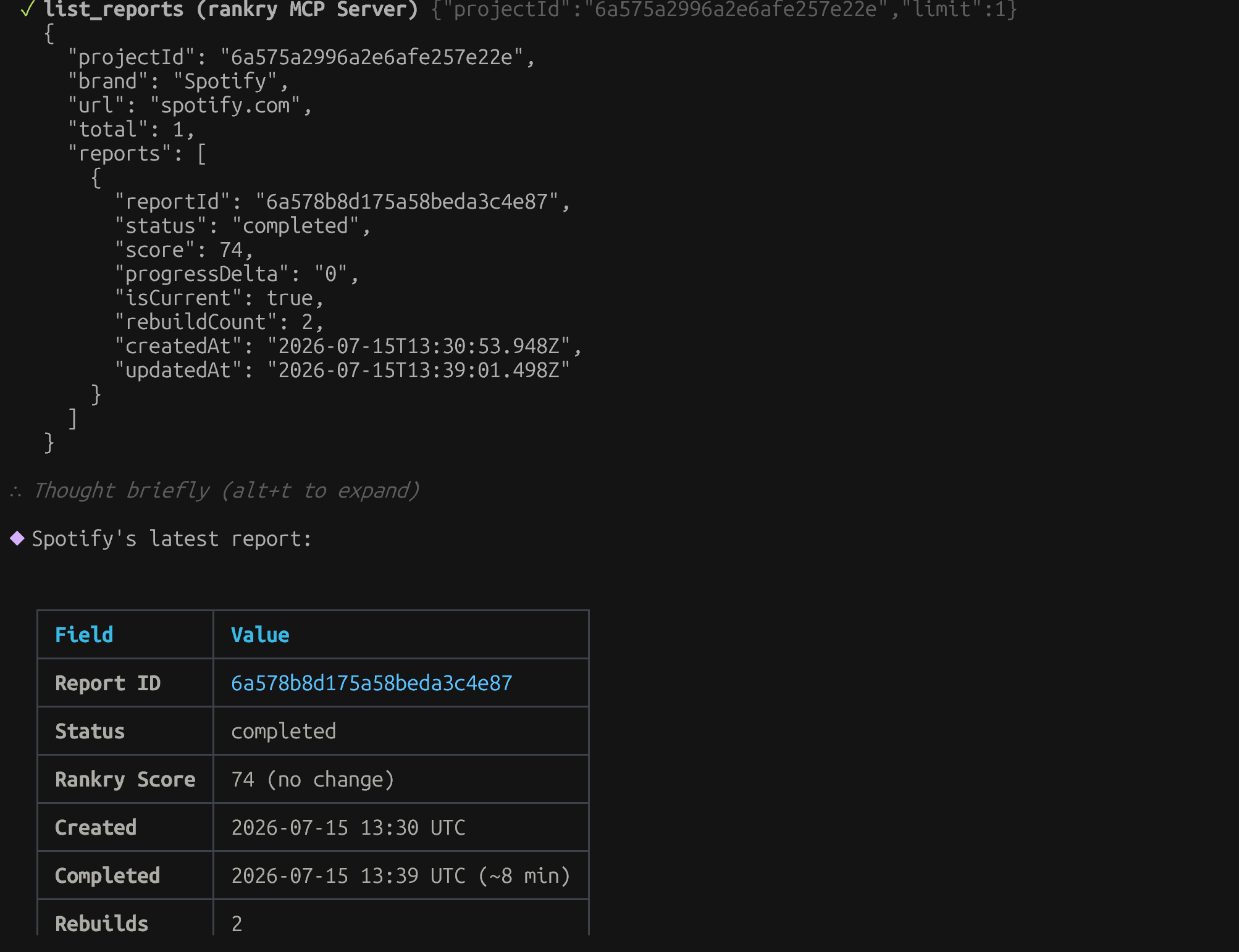
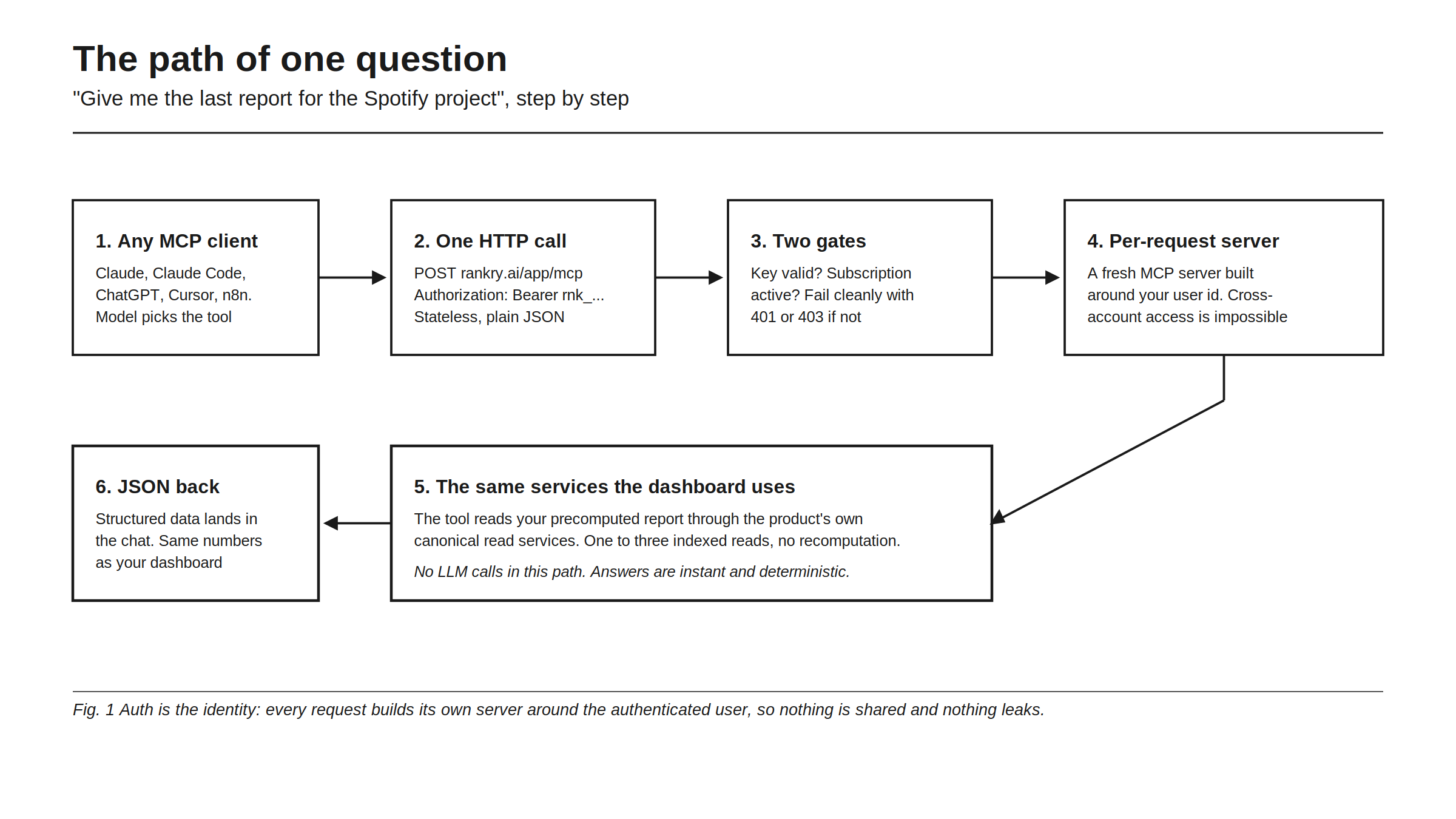
Under the hood, six things happen. Your MCP client sends one HTTP call: a POST to rankry.ai/app/mcp with your key in a standard Authorization: Bearer header. The request passes two gates, is the key valid, and is the subscription active, and fails cleanly with a 401 or 403 if not. Then a fresh MCP server instance is built for that single request, bound to your authenticated user ID. The tool reads your precomputed report through the product’s canonical read services, one to three indexed database reads, and structured JSON goes back to the chat.
Two design points in that path are worth naming. First, there are no LLM calls anywhere in it. Rankry’s pipeline precomputes your reports on schedule; MCP only reads them. That makes answers effectively instant and, more importantly, deterministic: the same question against the same report returns the same numbers every time. Second, the server is stateless by construction. Nothing is shared between requests, no sessions, no sticky routing, which is also why cross-account access is not a bug we guard against but a code path that does not exist: every data query is scoped to the owner baked into that request’s server instance.
The nine tools
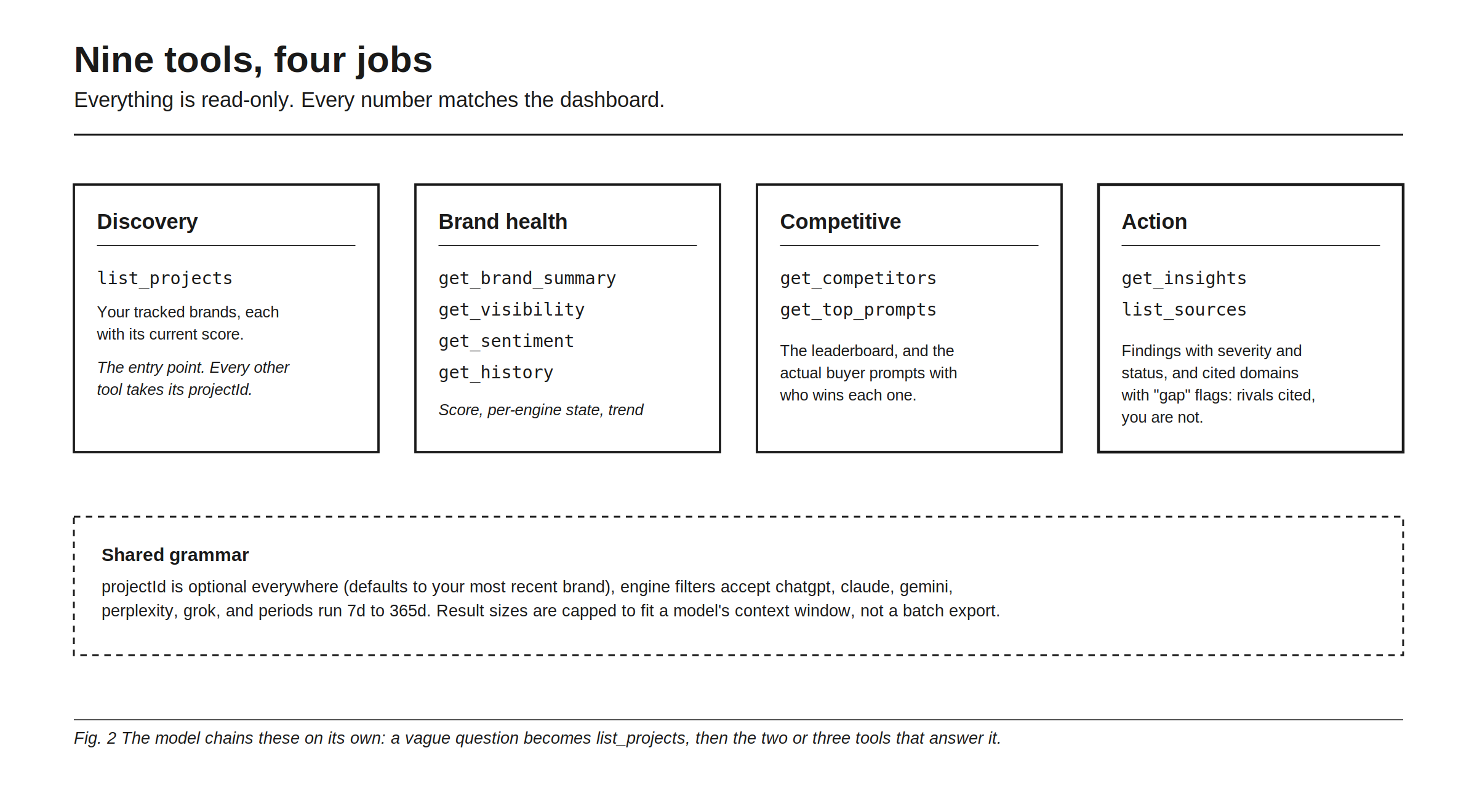
The tools split into four jobs. Discovery: list_projects returns the brands you track, each with its current Rankry Score, and its projectId feeds every other tool (omit it and the server defaults to your most recently updated brand). Brand health: get_brand_summary is the richest payload, your score with its change, per-engine visibility, sentiment and average position, consistency across models, and the top five insights; get_visibility, get_sentiment, and get_history break those down by engine and over time. Competitive: get_competitors returns the leaderboard against your tracked rivals, and get_top_prompts lists the actual tested buyer prompts, which engines mentioned you, your average rank, and which competitors were named alongside. Action: get_insights returns findings tagged by severity and status, and list_sources returns the cited web domains ranked by citations, each typed (review, community, publisher, wiki, competitor, own) and statused, where gap means rivals are cited there and you are not.
The shared grammar is deliberately small: engine filters accept chatgpt, claude, gemini, perplexity, grok; periods run 7d to 365d; and list sizes are capped (insights and prompts at 50, sources at 100) because the consumer is a model’s context window, not a batch exporter. Raw per-prompt LLM responses are not exposed over MCP, those stay in the dashboard; the tools return aggregated views.
The interesting part is what the model does with this surface unprompted. Ask something vague like “how am I doing on AI search this week and what should I fix first”, and the client chains list_projects, get_brand_summary, and get_insights on its own. The tool map is designed so that the obvious chains answer the common questions.
Four workflows this replaces
In practice, four patterns cover most usage. The morning check-in: “how is my brand doing on AI search this week?” becomes one get_brand_summary call with a period, and the answer arrives where you are already working. The competitor gap: “where is [rival] beating me?” chains get_competitors with get_top_prompts, and you get the exact prompts you lose with who wins them. Content planning: “which domains cite my competitors but not me?” is list_sources filtered to gap status, which is literally an outreach to-do list. And automation: the same endpoint speaks to n8n or any HTTP-capable workflow tool, so a weekly Slack digest of your score and new critical insights is a small workflow, not an integration project.
Security model: boring on purpose
The whole server is read-only at the protocol level. All nine tools are reads, no mutation tool is registered at all, and each tool carries the MCP readOnlyHint annotation so clients know it too. A key that leaks can see your reports; it cannot change, delete, or trigger anything. That is the property that lets you paste the config into any client without a threat-modeling session.
Keys are rnk_ plus 64 hex characters, 256 bits from a cryptographic random source, passed as a standard Bearer header. You mint them in Account Settings, in the API & MCP card: name the key for its client (“Claude Desktop”, “n8n”), create it, and the plaintext is shown exactly once. The server stores only a SHA-256 hash and a masked display form, so a database leak does not leak keys. Every key shows its last-used time, so stale ones are easy to spot, and revocation is instant and soft, revoked keys never authenticate again but are kept for audit. Rotation is create-new, revoke-old, two clicks.
Failure modes are explicit and client-friendly: an invalid or revoked key returns 401 with a JSON-RPC error envelope and a WWW-Authenticate header, so compliant clients prompt you for a token instead of failing silently; a valid key on a lapsed subscription returns 403 with a human-readable message. And the endpoint is rate-limited at two layers, a pre-auth per-IP backstop of 600 requests per minute that absorbs unauthenticated floods before any key lookup, and a per-key limit of 60 requests per minute after auth, with 429s carrying a Retry-After hint.
Setup in under a minute
Everything lives in one place: Account Settings (the user menu, top right) → the API & MCP card. Create a key there and the card generates the exact config with your key pre-filled, one copy button.
For Claude Desktop or any JSON-config client:
{
  "mcpServers": {
    "rankry": {
      "type": "http",
      "url": "https://rankry.ai/app/mcp",
      "headers": { "Authorization": "Bearer rnk_your_key_here" }
    }
  }
}
For Claude Code, one line:
claude mcp add --transport http rankry https://rankry.ai/app/mcp \
  --header "Authorization: Bearer rnk_your_key_here"
ChatGPT connects through developer-mode connectors, and Cursor, Windsurf, n8n, and the OpenAI and Gemini SDKs take the same URL-plus-header configuration. The honest framing: this works with any MCP client that speaks Streamable HTTP and can set a header, which is effectively all of them, current and future. MCP access is included with every paid plan and the free trial, no add-on, no extra charge.
Two engineering lessons from building it
The build itself was small: about 1,100 lines server-side on the official TypeScript MCP SDK, Streamable HTTP in stateless mode with plain JSON responses, 23 dedicated tests, designed, built, and live in one working day. Two lessons from it generalize to anyone shipping an MCP server on top of an existing product.
First: never reimplement your product’s analytics inside the MCP layer. The first version of list_sources hand-rolled its own domain aggregation from stored citations, and confidently reported vertexaisearch.cloud.google.com, Gemini’s redirect wrapper, as our top cited source. The dashboard showed the correct list, because the dashboard’s citation service already knew how to unwrap redirects and normalize domains. The fix was not to patch the aggregation but to delete it and call the same service the dashboard calls. That decision is now a rule: every MCP tool wraps a canonical product service, which is exactly why MCP answers and dashboard numbers cannot diverge.
Second: build the server per request, around the authenticated user. Instead of one shared server object with permission checks sprinkled through it, each request constructs a fresh MCP server with the user’s identity captured in the tool closures. Auth is the identity, there is no session state, the endpoint scales horizontally with zero sticky-session plumbing, and an entire class of authorization bugs becomes structurally impossible rather than carefully avoided.
Two smaller calls worth recording: API keys over OAuth for v1, because a Bearer header works today in every header-capable client while OAuth 2.1 is planned as the path to one-click connectors; and SHA-256 over bcrypt for key hashing, because 256-bit random keys are not brute-forceable by pre-image and per-request bcrypt would tax every single tool call for no security gain.
What is planned
Three things, no dates promised: OAuth 2.1, which unlocks one-click “Connect” in the claude.ai and ChatGPT connector directories; and a first write tool, likely “trigger a report re-run”, gated by plan and spend budget, which is why the read-only guarantee is stated as a property of today’s server, not a forever promise. The full tool reference lives in the docs at docs.rankry.ai.
FAQ
What is the Rankry MCP server? A hosted, read-only MCP endpoint that lets AI clients like Claude, ChatGPT, and Cursor query your Rankry AI visibility data, score, per-engine visibility, sentiment, competitors, prompts, insights, and cited sources, in plain language, with the same numbers as your dashboard.
How do I connect Claude to Rankry?
Create a key in Account Settings under the API & MCP card, then add the generated config to Claude Desktop, or run one claude mcp add command for Claude Code. The card pre-fills the exact snippet. Total time is under a minute.
Is the Rankry MCP server safe to connect? It is strictly read-only: all nine tools are reads and no mutation tool exists on the server. Keys are 256-bit, stored only as hashes, revocable instantly, and scoped to your account with per-request isolation, so a leaked key can view reports but cannot change anything.
Which MCP clients work with Rankry? Any client that speaks MCP over Streamable HTTP with a custom header: Claude Desktop, Claude Code, ChatGPT developer-mode connectors, Cursor, Windsurf, n8n, and the OpenAI and Gemini SDKs all take the same URL-plus-header config.
Does MCP access cost extra on Rankry? No. It is included with every paid plan and the free trial, gated by the same subscription access as the dashboard itself.
Can the MCP server modify or delete my data? No. There is no write tool on the server today, every tool is annotated read-only at the protocol level. A write tool (triggering a report re-run) is planned as opt-in, plan-gated future work.
Connect your AI visibility data to the tools you already work in. Start a free 7-day Rankry trial, no card, MCP included, first report in two minutes.