Yes. ChatGPT, Perplexity, Gemini, Claude, Grok, Copilot, and Google AI Overviews send real human visitors to websites when their answers cite or link a source and the reader clicks through. That click is a normal session carrying a referrer from the AI tool’s domain. The catch is that a large share of it never shows up labeled correctly in Google Analytics, so most teams undercount it badly. This guide explains how to find AI traffic in GA4, how to set up tracking that survives the gaps, why visibility and referral traffic are not the same number, and what a healthy result looks like in 2026.
The new referral source
AI referral traffic, also called LLM traffic, is the set of human visitors who land on your site after clicking a link inside an AI assistant’s answer. Someone asks a question, the assistant names sources, the reader clicks, and a session arrives on your site.
Two distinctions matter before you measure anything.
First, this is people, not bots. The crawlers that read your pages for training or live answers (GPTBot, ClaudeBot, PerplexityBot) never appear in GA4, which only fires for real browsers. AI referral traffic is the human on the other end of those answers.
Second, the volume is small but growing fast and converting unusually well. Independent estimates put AI referrals at low single-digit percentages of total traffic today, growing roughly 40% or more month over month, and several datasets report AI-referred visitors converting at multiples of standard Google organic, with figures around 14% versus under 3% cited across studies. The traffic is rare, rising, and high-intent, which is exactly the kind you want attributed correctly.
The domains to know, because every tracking method depends on them: chatgpt.com and chat.openai.com, perplexity.ai, gemini.google.com, claude.ai, copilot.microsoft.com, and emerging ones like meta.ai and grok.x.com.
How to find AI traffic in GA4
On May 13, 2026, Google added a native AI Assistant channel to GA4’s Default Channel Group. When a session arrives with a referrer matching a recognized AI domain, GA4 tags it with the medium ai-assistant and files it under the AI Assistant channel automatically.
To find it: open Reports, then Acquisition, then Traffic acquisition, and set the primary dimension to Session default channel group. If you have had AI traffic since the channel went live, AI Assistant shows up as its own row.
It is a fast read, but it has three limits worth knowing up front. It recognizes only ChatGPT, Gemini, and Claude, so Perplexity and Copilot stay buried in Referral. It only catches sessions that arrive with an intact referrer. And it does not backfill, so it starts counting from mid-May 2026 forward, with no history.
For a quick manual check without any setup, go to Traffic acquisition, switch the primary dimension to Session source / medium, and search the table for chatgpt, perplexity, gemini, claude, and copilot. Whatever passed a referrer will surface there.
Setting up proper tracking
The native channel is the floor, not the finish. The reliable 2026 setup runs it alongside a custom channel group that covers what it misses.
-
In GA4, open Admin, then Channel Groups under Data Display, and create a new channel group. Name it something you will maintain, like AI Traffic 2026.
-
Add a channel named AI Search defined by Session source matching this regex:
chatgpt\.com|chat\.openai\.com|perplexity\.ai|claude\.ai|gemini\.google\.com|copilot\.microsoft\.com|meta\.ai|grok\.x\.com-
Drag the new AI channel above the Referral channel. This step is the one people skip and then wonder why their numbers stay wrong. GA4 evaluates rules in order, so if Referral fires first, your AI traffic stays misclassified.
-
Save. Note that custom channel groups apply from creation forward and do not backfill in the standard reports. To see history, use Explore, then Free-form, add Session source / medium as a dimension, and filter for the same domains across the date range you want.
-
Add Landing page as a secondary dimension. This tells you which specific pages AI engines are sending people to, which is the single most useful view here: it shows which content is actually being cited and clicked.
Maintain the regex quarterly. New AI surfaces appear constantly, and a list that was complete in spring is partial by autumn.
For the step-by-step version of this setup, including the Explore report for history and where the method hits its ceiling, see how to track AI referral traffic in GA4.
The attribution gap nobody warns you about
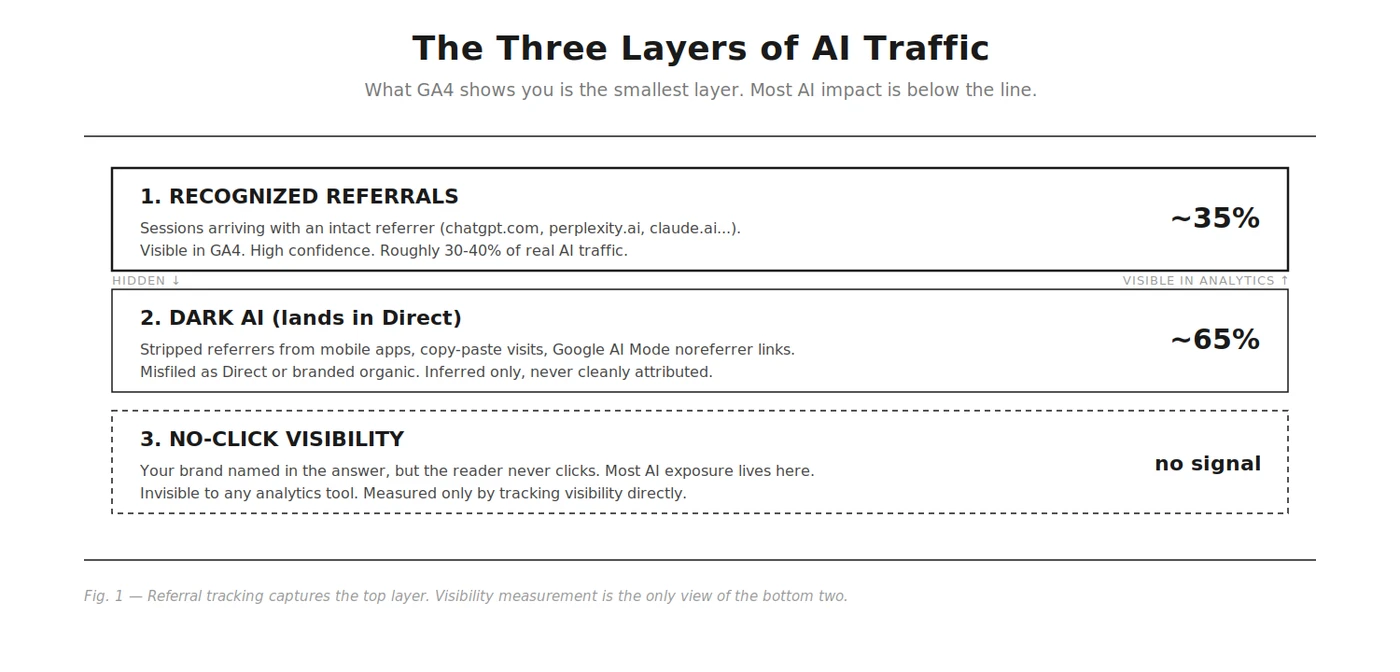
Even with a flawless setup, you are seeing a fraction of AI-influenced visits. Industry estimates consistently put visible AI referrals at roughly 30 to 40% of the real total, with the rest landing in Direct. This is the most important thing to understand about the channel, so it is worth being precise about why.
-
Stripped referrers. ChatGPT’s mobile apps and many free-tier responses suppress the referrer header. The visit happens, but GA4 has nothing to attribute it to and files it as Direct.
-
Copy-paste behavior. Many people do not click. They read the answer, copy your URL, and paste it into a new tab. That opens a fresh session with no referrer, indistinguishable from someone typing your address from memory.
-
Google AI Mode and AI Overviews. Clicks from Google’s AI surfaces pass through as ordinary google / organic, with no signal that an AI summary was involved. AI Mode uses a noreferrer link deliberately. There is no workaround.
The practical consequence: if your Direct or branded-organic traffic has been climbing and someone on your team is calling it brand growth, a meaningful share of it is probably AI referrals in disguise. Two heuristics get you closer to the truth. Watch Direct traffic to deep content pages that nobody bookmarks or types from memory, because a guide buried three levels into your site does not earn real Direct visits. And watch Bing organic, since Copilot grounds many answers in Bing’s index, so a Bing surge can flag Copilot citations that never attribute. The honest framing for stakeholders: perfect attribution is not coming soon, the platforms have no incentive to provide it, so measure the trackable fraction well and treat it as a floor.
The highest-signal low-cost fix sits outside analytics entirely: add a “How did you hear about us?” open-text field to key conversion forms. Buyers who found you through ChatGPT often just say so.
Visibility versus referral traffic
These are two different numbers, and conflating them is the most common mistake on this topic.
Referral traffic measures clicks: humans who left an AI answer and arrived on your site. Visibility measures presence: whether your brand showed up in the answer at all, in what position, with what sentiment, before anyone clicked or didn’t.
Most AI exposure produces no click. When an assistant recommends your brand and the reader is satisfied with the answer, or copies your name into a new search, the exposure happened and your analytics will never show it. One study found only 12 to 18% of Perplexity citations produce actual click-through. So referral traffic, even tracked perfectly, captures a small slice of the value, and right now it lags visibility by a wide margin: a brand can be cited across thousands of answers and still see thin referral numbers, because the click economics of AI answers are early and the apps keep users inside the chat.
That gap is the case for measuring visibility directly rather than waiting for traffic to prove it. Referral traffic tells you who clicked. Visibility tells you whether you are in the answers at all, which is the leading indicator the clicks will eventually follow. This is the layer Rankry tracks across the engines you select: whether you are named, where, and how, independent of whether the click was attributable. The two measurements answer different questions, and a serious AI search program needs both.
What good looks like
Realistic expectations for 2026:
- AI referrals in the low single digits of total traffic for most sites, higher for B2B and technical content where Claude and Perplexity over-index.
- Visible AI referrals representing only 30 to 40% of the real total, so quietly multiply what you see to estimate actual impact.
- ChatGPT dominating your AI referral mix, Gemini and Perplexity trading the second spot, everything else a rounding error.
- Engagement and conversion from AI traffic meeting or beating your organic baseline. If a page pulls AI traffic but visitors bounce, that is a landing-page match problem, not a citation problem.
- Direct traffic to deep, un-bookmarkable pages trending up as the shadow of your real AI footprint.
The takeaway: AI does send real, high-intent visitors, you can capture the trackable third of them in about thirty minutes of GA4 setup, and the other two-thirds plus all the no-click brand exposure is why measuring AI visibility directly matters more than waiting for referral traffic to show up in a dashboard.
Related Rankry resources
- Best AI Search Monitoring Tools — track your presence in AI search.
- AI Search Monitoring — what it covers and why.
- AI Platforms — per-engine visibility tracking.