To track AI referral traffic in Google Analytics 4, create a custom channel group for AI sources, define it with a regex matching the AI domains (chatgpt.com, perplexity.ai, claude.ai, gemini.google.com, copilot.microsoft.com and others), drag it above the Referral channel so it evaluates first, and build a Free-form Explore report to see historical data, since custom channel groups do not backfill. Since 13 May 2026 GA4 also has a native “AI Assistant” channel that catches part of this automatically. This works, but it has real limits: it misses copied-and-pasted URLs (filed as Direct) and AI Overview clicks (bundled into Organic), and the regex needs updating every quarter. This guide covers the full manual setup, its blind spots, and when a dedicated script is the better tool.
If your Direct traffic has been climbing for no obvious reason, some of it is almost certainly AI referrals that GA4 has misfiled. Here is how to find what can be found.
Why GA4 hides AI traffic by default
The core problem is that GA4 was built before AI referrals existed, so it scatters them. A click on a link inside a ChatGPT answer lands in Referral, mixed with blog mentions and press. A URL someone copied from an AI answer and pasted into a new tab arrives with no referrer, so GA4 files it under Direct, right next to people who typed your address. The tells that separate those two populations are in why your direct traffic is exploding. And a click from a Google AI Overview carries a google.com referrer, so it counts as Organic. One real channel, split three ways, which is why it looks like noise instead of your fastest-growing acquisition source.
Google closed part of this itself. On 13 May 2026 a native “AI Assistant” channel arrived in GA4’s Default Channel Group: when a session comes in with a referrer matching a recognized AI assistant, GA4 tags the medium as ai-assistant and files it under the new channel with no configuration from you. It is a genuine improvement and the fastest read you can get, but it recognizes only a short list of assistants, it sees nothing that arrives without a referrer, and it does not backfill, so your history starts in mid-May 2026. Treat it as the floor and build the rest yourself.
The manual GA4 setup, step by step
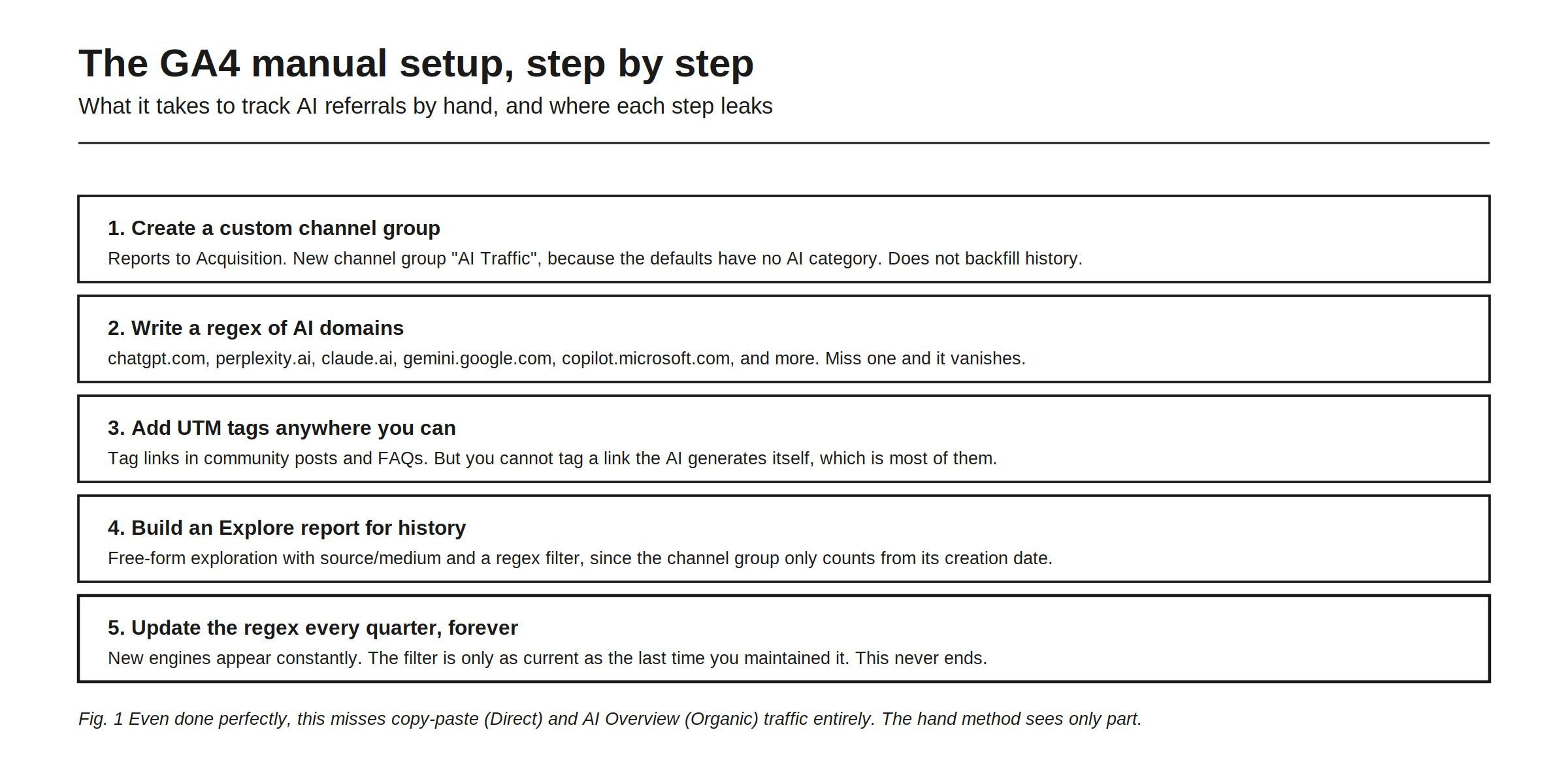
Five steps get you most of the way.
1. Create a custom channel group. Open Admin, then Channel Groups under Data Display, and create a new group named something you will maintain, like “AI Traffic 2026”. The default groups have no AI category beyond the native channel, and custom groups do not backfill history.
2. Write a regex of AI domains. Add a channel defined by Session source matching a pattern along these lines:
chatgpt\.com|chat\.openai\.com|perplexity\.ai|claude\.ai|gemini\.google\.com|copilot\.microsoft\.com|grok\.com|you\.com|phind\.comAny engine you leave out simply vanishes into Referral.
3. Drag the new channel above Referral. This is the step people skip and then wonder why the numbers do not change. GA4 evaluates channel rules in order, so if Referral fires first your AI traffic stays misclassified.
4. Build an Explore report for history. Custom channel groups only count from their creation date forward. Open Explore, choose Free-form, add Session source / medium as a dimension, and filter on the same domains across the date range you want. Add Landing page as a secondary dimension while you are there, because knowing which pages AI sends people to is the most actionable view in the whole setup.
5. Update the regex every quarter, forever. New AI surfaces appear constantly, and a list that was complete in spring is partial by autumn.
Done carefully, this gives you a usable view of the AI referrals that pass a referrer to GA4. The catch is in the next section. For the wider picture of what this traffic is worth and how it behaves once it lands, see AI referral traffic: does ChatGPT and Perplexity send visitors.
The blind spots even a perfect setup misses
Here is what the guides rarely say plainly: even a flawless GA4 setup only sees part of the AI channel, and the missing part is missing for everyone.
Copy-paste traffic is invisible, because a URL pasted from an AI answer arrives with no referrer and stays in Direct no matter how good your regex is. AI Overview traffic stays in Organic, because it carries a google.com referrer that looks exactly like ordinary Google search. And prompt-level context is gone: GA4 can tell you a visit came from chatgpt.com, but not what the person asked or whether you were recommended or merely mentioned.
The native AI Assistant channel helps with the referrer-passing sources and does nothing about the other two. So the honest ceiling of the manual method is a partial, high-maintenance view of one slice of AI traffic, with no connection to why the traffic came. That is still worth having. It is just worth knowing what you are holding.
Manual vs a purpose-built script
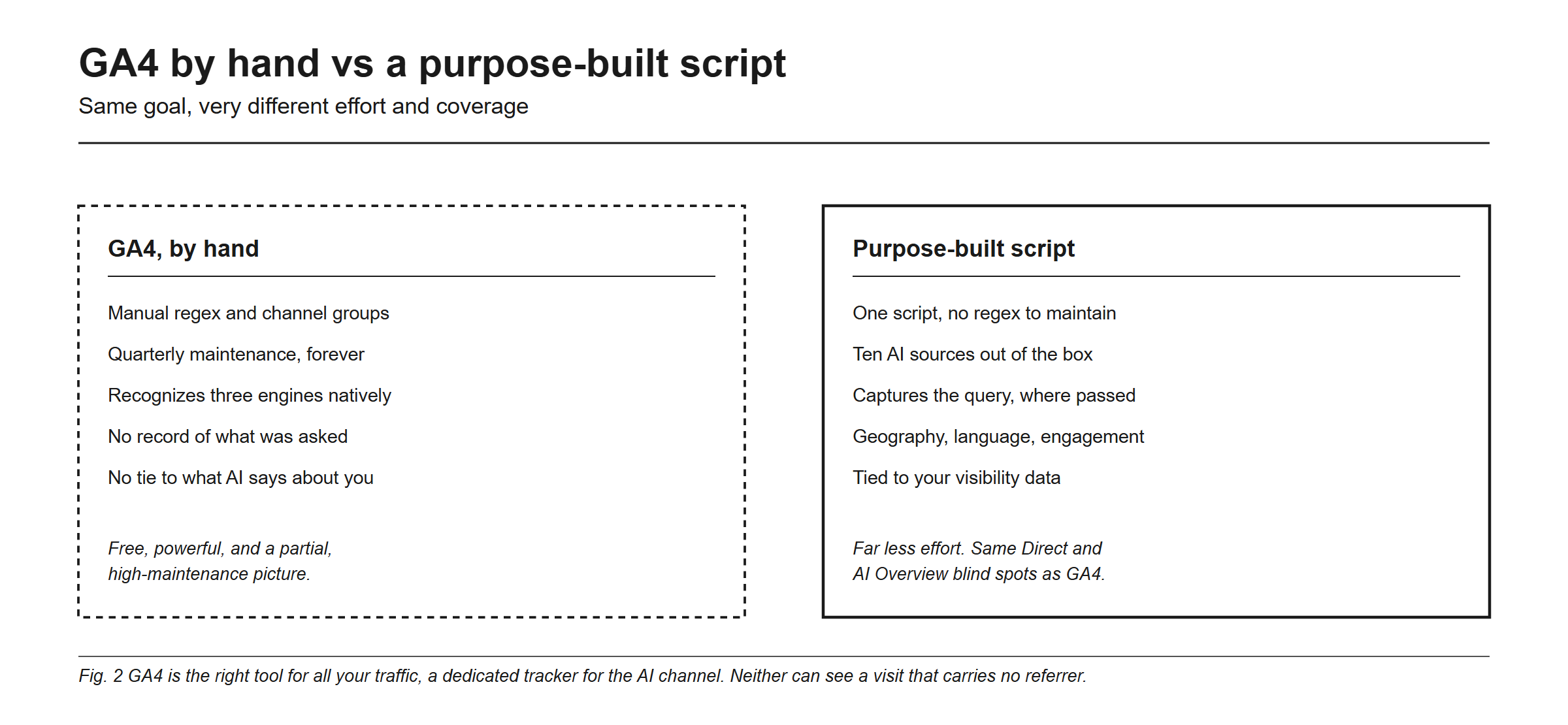
The tradeoff is effort and coverage versus control, and it is narrower than most comparison pages pretend. GA4 by hand is free and powerful and remains the right tool for all your traffic together, but for AI specifically it means manual regex and channel groups, quarterly maintenance forever, native recognition of a short engine list, and no record of what the visitor actually asked. A purpose-built script removes the maintenance and widens the default coverage. What it does not do is see through the two blind spots above, because nothing can.
Rankry’s AI Traffic dashboard is that script. You add one lightweight snippet and see total AI visits, the platform breakdown, visitor geography, languages, device split, engagement time, and top AI landing pages, with no regex and no quarterly upkeep. It recognizes ten AI sources out of the box, ChatGPT, Perplexity, Claude, Gemini, Grok, Copilot, Bing Chat, You.com, Phind, and Poe, and for Perplexity, Phind, You.com, and Bing Chat it reads the query out of the referrer URL, so you see the question that sent the visit. It sits in the same project as your visibility data, which is what lets you connect a rise in citations to a rise in visits. The dashboard is a Pro-plan feature; the full write-up is in introducing AI Traffic.
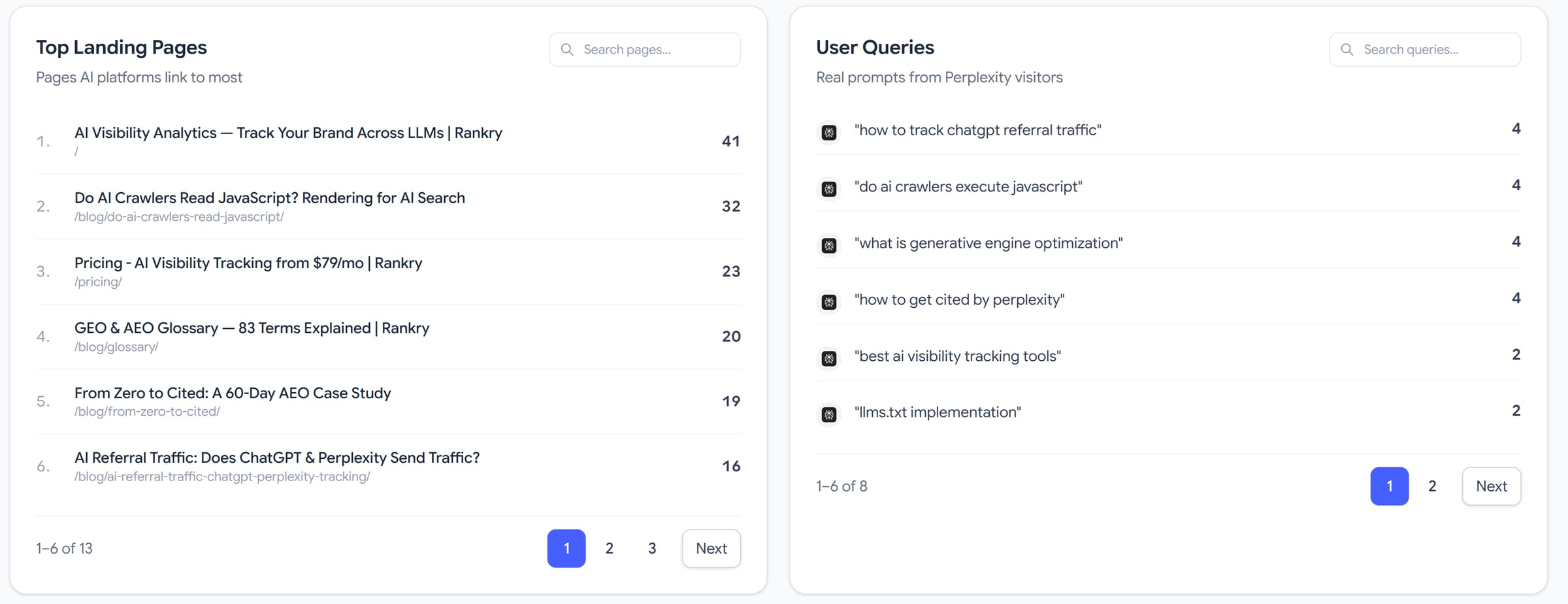
The point is not that GA4 is bad. It is that a tool built for one channel reports that channel without a maintenance tax.
Which should you use
Use both, for different jobs. Keep GA4 for your whole-site analytics and conversions, and set up the manual AI channel if you want the raw data inside GA4 alongside everything else. Add a dedicated AI tracker when you want the AI channel without the quarterly upkeep, when you want the wider engine list by default, and when you want traffic sitting next to visibility so a rise in AI visits can be traced back to the prompts and sources that caused it. For the revenue question behind all of this, see do AI answers actually drive traffic and revenue.
FAQ
How do I track AI referral traffic in GA4? Create a custom channel group under Admin, Data Display, Channel Groups. Add a channel defined by Session source matching a regex of AI domains, drag it above the Referral channel so it evaluates first, and use a Free-form Explore report for history, since channel groups do not backfill. GA4’s native AI Assistant channel also catches some of this automatically.
Does GA4 track ChatGPT traffic automatically?
Partly. On 13 May 2026 Google added a native AI Assistant channel to GA4’s Default Channel Group, which tags recognized AI referrers with the medium ai-assistant. It recognizes a short list of assistants, it only sees sessions that arrive with an intact referrer, and it does not backfill, so it is a floor rather than a complete picture.
Why is my AI traffic showing up as Direct in GA4? Because a URL copied out of an AI answer, or a link opened inside an AI mobile app, often arrives with no referrer at all, and GA4 files every referrer-less visit under Direct. No regex can recover these, and neither can any third-party tracker, since there is no signal in the request to read.
What regex should I use for AI traffic in GA4? Match the current AI domains, for example chatgpt.com, chat.openai.com, perplexity.ai, claude.ai, gemini.google.com, copilot.microsoft.com, grok.com, and add new engines as they appear. Update it quarterly, because your coverage is only as current as your last edit.
Is there an easier way than GA4 regex? Yes. A purpose-built AI tracking script identifies AI referrers automatically with no regex and no quarterly maintenance, recognizes a wider default set of AI sources, and can tie the traffic to what AI says about you. It cannot see referrer-less visits either, so it removes the maintenance, not the blind spot.
Skip the regex and the quarterly upkeep: see your AI referral traffic tied to what AI says about you, in one dashboard. Start a free 7-day Rankry trial, no card, first report in two minutes.