Rankry now tracks the real visitors that AI engines send to your website, not just what those engines say about you. With a single tracking script, the new AI Traffic dashboard shows how many people arrived from ChatGPT, Perplexity, Claude, Gemini, Grok, Copilot, and four smaller assistants, which countries and languages they came from, what devices they used, how long they stayed, and which pages they landed on. It closes the loop that most AI visibility tools leave open: until now you could see whether AI recommended you, but not whether that recommendation turned into an actual person on your site. Now you can see both, in one place, without touching a Google Analytics regex filter.
Visibility tells you the cause; traffic tells you the effect. Here is how it works, and, just as important, where it stops.
The two halves of AI visibility
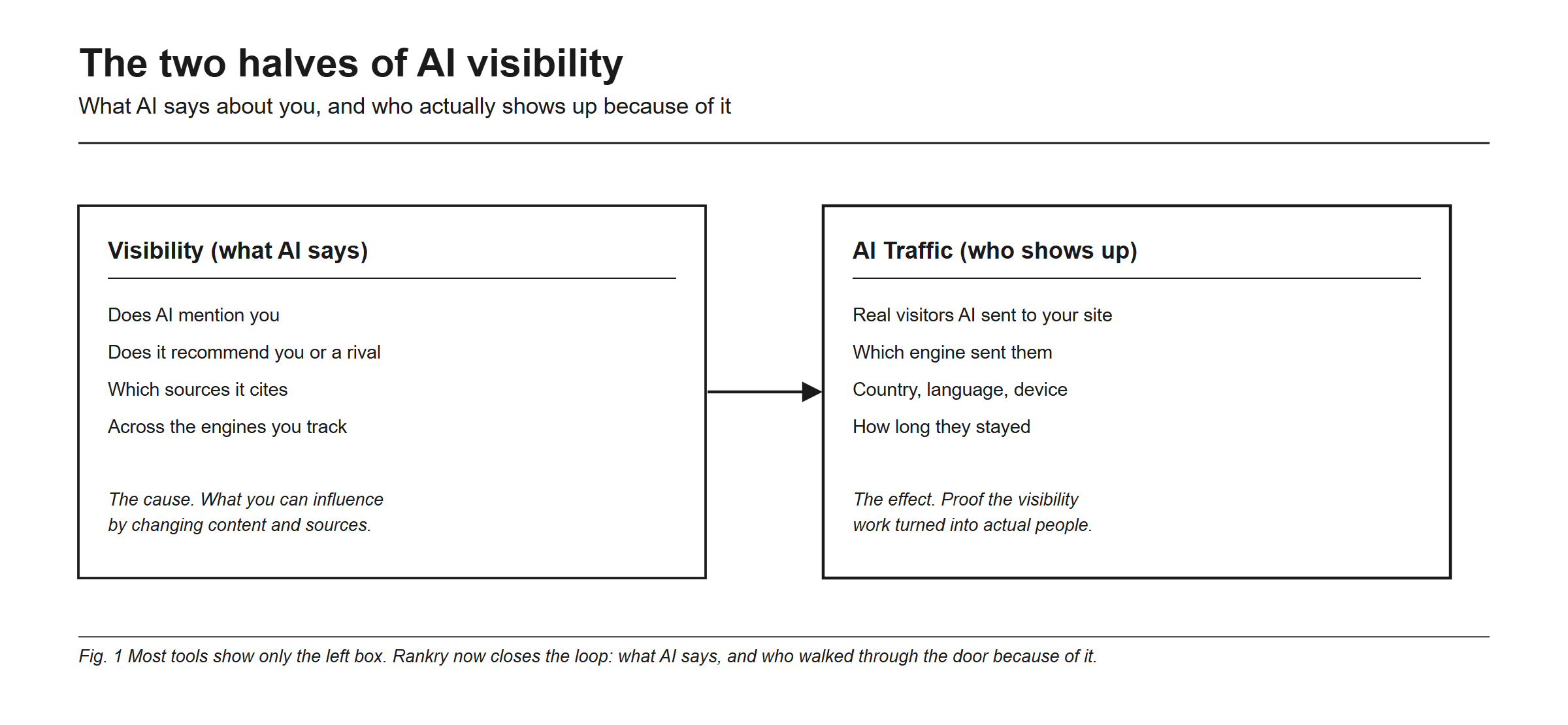
AI visibility has always had two halves, and most tools only measure one. The first half, what AI says, is whether AI mentions you, recommends you or a rival, and which sources it cites, across the engines you track. That is the cause, the part you influence by changing your content and your sources. The second half, who shows up, is the real visitors AI sent to your site: which engine sent them, their country, language, and device, and how long they stayed. Separating those people from the crawlers and agents in the same logs is covered in bots versus humans in your traffic. That is the effect.
Most tools show you only the left box and ask you to trust that it matters. Rankry now shows both, so you can connect a rise in visibility to a rise in real traffic, and answer the question every founder and CMO asks: is any of this AI work actually bringing people to my site.
Why you cannot see this in Google Analytics
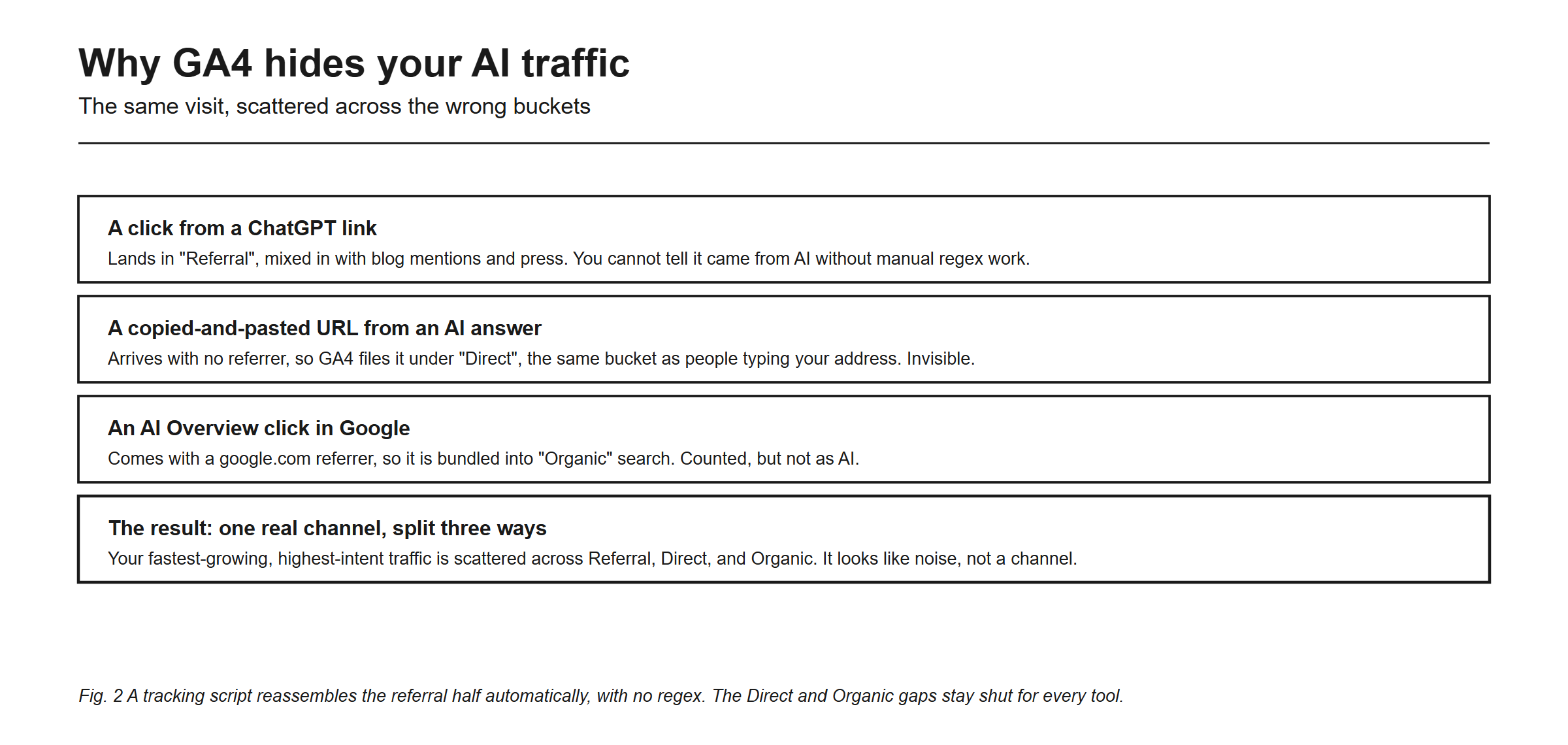
Google Analytics scatters AI traffic across the wrong buckets. A click from a ChatGPT link lands in “Referral”, mixed in with blog mentions and press. A copied-and-pasted URL from an AI answer arrives with no referrer, so GA4 files it under “Direct”, next to people typing your address. And an AI Overview click carries a google.com referrer, so it is bundled into “Organic”, counted but not as AI.
Google closed part of this itself: on 13 May 2026 a native “AI Assistant” channel arrived in GA4’s Default Channel Group, tagging recognized AI referrers automatically. It recognizes a short list of assistants, sees nothing that arrives without a referrer, and does not backfill. Everything past that floor is still manual work: custom channel groups, a regex you maintain every quarter, and an Explore report to recover history. Our own walkthrough of that process is in how to track AI referral traffic in GA4, and the honest verdict is that it is a lot of upkeep for a partial picture.
How Rankry AI Traffic works
You add one lightweight script to your site, the same way you would add any analytics snippet:
<script async src="https://rankry.ai/t.js" data-project="YOUR_PROJECT_ID"></script>From then on, Rankry identifies visits that arrived from an AI assistant and assembles them into a single AI Traffic view:
- Ten AI sources recognized out of the box. ChatGPT, Perplexity, Claude, Gemini, Grok, Microsoft Copilot, Bing Chat, You.com, Phind, and Poe. No regex to write, no list to maintain.
- The query behind the visit. For Perplexity, Phind, You.com, and Bing Chat the referrer URL carries the question the person asked, so you see the actual prompt that sent them, not just the domain.
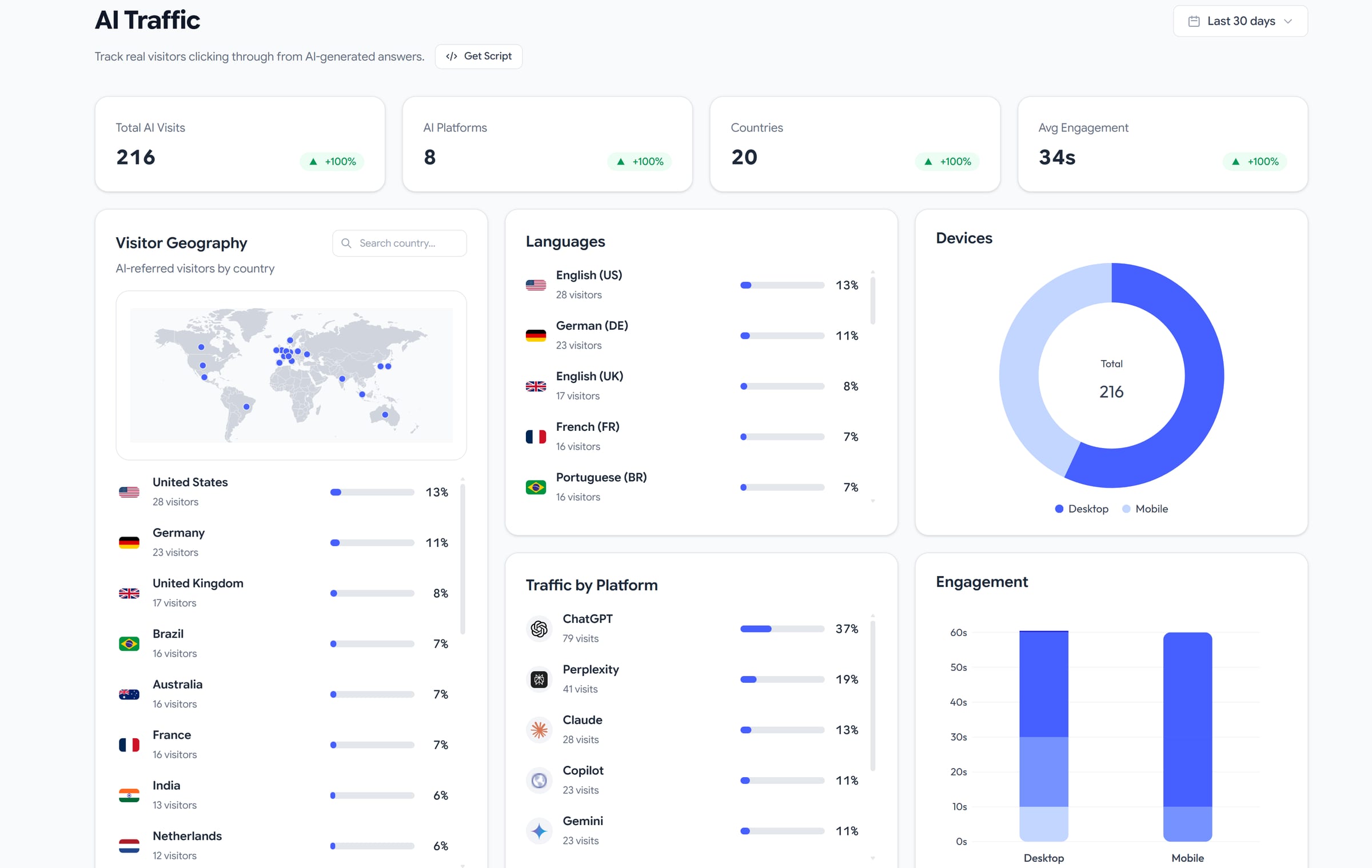
- Total AI visits and the trend, with a period-over-period comparison over any window up to 90 days.
- Traffic by platform, so you can see which engine is actually sending people.
- Geography and language by country and by visitor language.
- Device split between desktop and mobile.
- Engagement time, sampled as visitors stay, with the distribution rather than a single average.
- Top AI landing pages, which is the view that tells you which content is being cited and clicked.
No cookies and no cross-site identifiers are used; the script reads the referrer, the landing page, and the browser’s own locale and screen size, and nothing else.
What it does not do
This is the part most launch posts skip, so here it is plainly. A visit that arrives with no referrer carries no evidence of where it came from. That means two gaps stay open, and they stay open for every analytics tool, including ours:
- Copy-paste visits are invisible. When someone copies your URL out of an AI answer and pastes it into a new tab, there is no referrer in the request. Nothing can recover it. Those visits stay in your Direct bucket.
- Google AI Overview clicks look like organic search. They carry a google.com referrer that is indistinguishable from an ordinary Google click.
So read your AI Traffic number as a floor rather than a full count. It is a precisely measured floor that moves with the real thing, which is what makes it useful: when your measured AI referrals double, the invisible share almost certainly moved with them. Anyone telling you their script recovers the copy-paste traffic is selling an inference, not a measurement. If your Direct bucket is what brought you here, why is my direct traffic increasing covers the diagnostic checks that work.
Why this traffic is worth watching closely
AI referral traffic is still a small slice of most sites’ total. Conductor’s 2026 AEO/GEO benchmark, across 13,770 enterprise domains and 3.3 billion sessions, put it at 1.08% of all traffic, with 87.4% of that coming from ChatGPT. What makes it worth instrumenting is not today’s volume, it is the slope and the intent. Similarweb’s 2026 figures showed Gemini referral visits up 388% year over year against roughly 52% for ChatGPT, and multiple 2026 analyses find AI-referred visitors converting several times better than standard organic, because they arrive having already read a summary that pre-qualified you. A channel that is small today, compounding fast, and unusually well-qualified is exactly the one you want instrumented before your competitors are. The revenue side is covered in do AI answers actually drive traffic and revenue.
Visibility plus traffic, in one loop
The reason to keep both halves in one tool is that they explain each other. When your visibility rises on a set of prompts and your AI traffic rises the same week, you have evidence the work is paying off. When traffic drops, you can look at visibility to see whether a model update or a competitor move caused it. Separately, each half is a number; together they are a feedback loop you can manage. That loop, see what AI says, change it, watch the traffic respond, is what turns AI visibility from a report into a growth channel. The visibility side is covered in how to monitor your brand across AI search engines.
Getting started
The AI Traffic dashboard is a Pro-plan feature. If you are on Pro, open the AI Traffic page in your project, copy the snippet from the Integration Snippet panel, and add it to your site’s <head> or through Google Tag Manager. Data starts appearing as AI-referred visits arrive. If you are on Base, the AI Traffic view is visible with an upgrade prompt in place of the data. Visibility tracking itself is on every plan: all seven engines are available, and each project runs the five you select.
FAQ
What is AI traffic tracking? Measuring the real visitors that AI assistants send to your website: which engine sent them, their country and language, device, engagement time, and landing pages. Rankry does this with a single script that recognizes ten AI sources and reports them as their own channel.
Why can’t I see AI traffic in Google Analytics? Because GA4 scatters it. Link clicks land in Referral mixed with other sources, copied URLs arrive with no referrer and fall into Direct, and AI Overview clicks are bundled into Organic. GA4’s native AI Assistant channel, added on 13 May 2026, catches part of the first group and none of the other two.
Which AI platforms does it track? Ten out of the box: ChatGPT, Perplexity, Claude, Gemini, Grok, Microsoft Copilot, Bing Chat, You.com, Phind, and Poe. For Perplexity, Phind, You.com, and Bing Chat the referrer URL also carries the question the visitor asked, so the prompt itself is recorded.
Does it catch the AI traffic hiding in my Direct bucket? No, and neither does anything else. A visit that arrives with no referrer carries no evidence of where it came from, so copy-paste visits and AI Overview clicks stay invisible to every analytics tool, ours included. Read your measured AI traffic as a floor that moves with the real number.
Is AI Traffic included on every plan? The dashboard is a Pro-plan feature. Base plans see the AI Traffic view with an upgrade prompt rather than data. Visibility tracking across the seven AI engines is on every plan, with five active per project.
Does AI traffic actually convert? Several 2026 analyses find AI-referred visitors converting well above standard organic, with the reported gap ranging from roughly four times upward depending on the study and on which conversion event is being counted. The direction is consistent; treat the specific multiples with care, since they measure different things.
See who AI sends to your site, and tie it to what AI says about you, in one dashboard. Start a free 7-day Rankry trial, no card, first report in two minutes.