Short answer: no. As of mid-2026, none of the major AI crawlers execute JavaScript. GPTBot, ClaudeBot, PerplexityBot, Grok’s fetcher and their siblings fetch the raw HTML your server returns, extract what they find there, and leave. The exceptions are the two engines that ride on established search infrastructure: Google AI Overviews inherit Googlebot’s rendering, and Microsoft Copilot inherits Bing’s, so a client-rendered page can be visible to those two and invisible to the rest. The one meaningful exception is Google’s Gemini, which rides on Googlebot’s rendering infrastructure.
If your site renders content on the client, that single fact may explain why AI engines never cite you. Here is what each crawler can and cannot do, how to test your own site in two minutes, and how to fix what you find.
Why this matters
When ChatGPT, Claude, or Perplexity answers a buyer’s question, the engine works from what its crawlers managed to read. The crawler does not see your site the way a visitor does. A visitor’s browser downloads your HTML shell, executes JavaScript, fetches data from your APIs, and assembles the page. An AI crawler stops at step one: it takes the initial HTML response and nothing else.
One analysis of more than 500 million GPTBot fetches found zero evidence of JavaScript execution. Not limited execution, not delayed execution. Zero. There is no rendering queue and no second pass. If your pricing, product descriptions, or docs arrive via client-side JavaScript, the crawler receives an empty div and moves on, and to every AI engine that relies on that crawl, your content does not exist.
The scale makes this expensive to ignore. AI crawlers now generate a meaningful share of all crawler traffic on the web, hundreds of millions of fetches per month for GPTBot and ClaudeBot alone. That is a parallel discovery channel reading your site every day, and it reads a much dumber version of it than Google does.
What each AI crawler can and cannot render
The split is simple once you see it.
Renders JavaScript:
- Googlebot, and by extension Gemini. Google’s Web Rendering Service executes JS in headless Chrome, so content that appears after rendering can still be indexed and can surface in Gemini. The usual caveats apply: rendering is queued, delayed, and can fail on blocked resources or slow scripts.
Does not render JavaScript:
- GPTBot (OpenAI training crawler)
- OAI-SearchBot (ChatGPT search index)
- ChatGPT-User (live fetches when a user shares or requests a URL)
- ClaudeBot and Claude-SearchBot (Anthropic)
- PerplexityBot and Perplexity-User
- Meta-ExternalAgent, Bytespider, and the rest of the field
Note what that list contains: both kinds of bots. Training crawlers that decide what models know, and retrieval bots that fetch pages live to answer a question happening right now. Neither kind runs your JavaScript. A retrieval bot answering a buyer’s question this second still reads only your raw HTML.
There is a second-order effect through search indexes too. ChatGPT search leans heavily on Bing’s index, and Bingbot’s JavaScript rendering is limited compared to Google’s. A fully client-rendered site risks being thin in the very index AI engines query, on top of being unreadable to their own crawlers.
The CSR trap
A client-side rendered single-page app sends every requester the same initial response: a near-empty HTML shell, a root container, and script tags. For humans, the app boots and the page appears. For AI crawlers, that shell is the entire page.
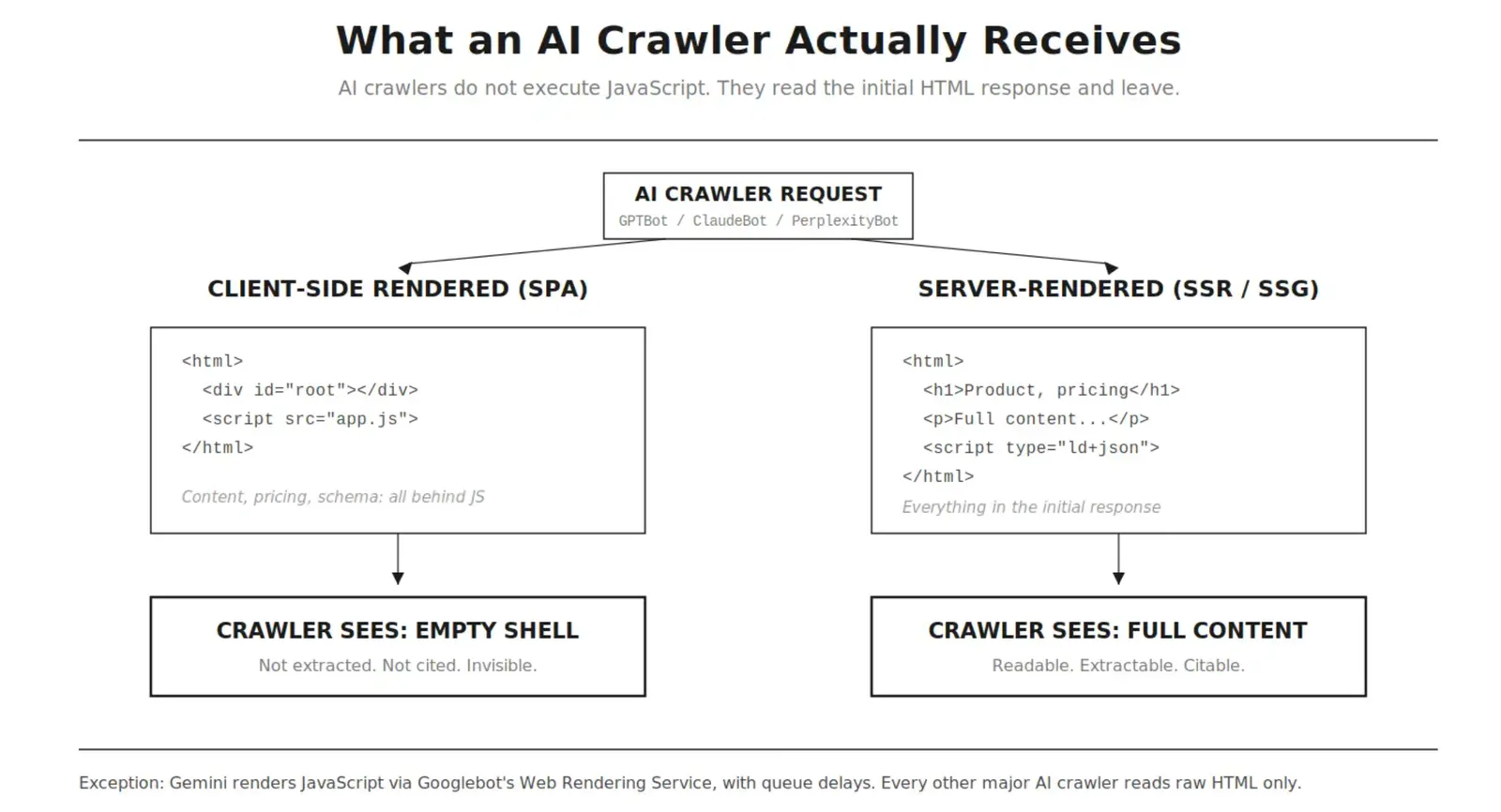
There is no partial credit here. Either your content is in the initial HTML response or it is not. A React, Vue, or Angular SPA without server rendering is not “slightly less visible” to AI engines. It is blank.
This includes the pieces people forget: JSON-LD schema injected by JavaScript, meta descriptions set by the framework after load, prices pulled from an API, reviews loaded on scroll. If JavaScript puts it on the page, AI crawlers never saw it.
How to test your site
You do not need tooling to get the truth, two minutes in a terminal or browser will do it.
-
View the raw source. Open your page, hit View Page Source (not Inspect, that shows the rendered DOM). Search for a sentence from your main content, your pricing, your schema. If it is not in the source, AI crawlers cannot see it.
-
Disable JavaScript. In Chrome DevTools, open the command menu and run “Disable JavaScript,” then reload. What survives is what a crawler gets. If you are staring at a spinner or a blank shell, so is GPTBot.
-
Fetch like a bot. From a terminal:
curl -A "GPTBot" https://yourdomain.com/your-page | grep "a phrase from your content"If grep comes back empty, the page is invisible to that crawler.
- Check the forgotten pages. Marketing sites are often server-rendered while docs, changelogs, and pricing tables live in a JS app. Test the pages you want cited, not only the homepage.
This rendering gap is one of the checks in Rankry’s AI Readiness audit, which runs 36 checks across crawl access, rendering, identity, architecture, citation readiness, and authority, and tells you which specific pages return empty to AI crawlers.
How to fix it
The goal is one sentence long: critical content must be present in the initial HTML response. There are three established routes.
-
Server-side rendering. Frameworks like Next.js, Nuxt, Astro, or Angular Universal render the page on the server and ship complete HTML. The browser still hydrates into a full app for users, but crawlers get everything without running a line of JS. This is the durable fix.
-
Static site generation. If content does not change per request (marketing pages, blogs, docs), pre-build pages to static HTML at deploy time. Fastest responses, zero rendering risk, and AI crawlers are known to favor content they can fetch cheaply and reliably.
-
Prerendering. If migrating an existing SPA to SSR is not realistic, a prerender layer detects bot user agents and serves them a pre-rendered HTML snapshot while humans get the app. It is a patch rather than an architecture, but it closes the visibility gap quickly.
For what it’s worth, we made this decision for Rankry’s own site before writing a single page: it runs on Astro with server-side rendering behind Cloudflare, so every page, including JSON-LD schema, ships as complete HTML. Our app behind the login is a JavaScript application, and that is fine. Crawlers have no business there anyway. The split worth copying: render publicly citable content on the server, spend your JavaScript budget behind authentication.
Whatever route you choose, keep schema and meta tags server-side too. Structured data that exists only after hydration might as well not exist.
The checklist
- Main content present in View Source on every page you want cited
- Page readable with JavaScript disabled
- curl with a bot user agent returns your content, not a shell
- JSON-LD schema and meta tags in the initial HTML, not injected client-side
- Docs, pricing, and changelog tested, not only the homepage
- SSR or SSG for public pages; prerendering as the fallback
- Re-test after every framework migration or major frontend release
Rendering is the cheapest AI visibility problem to diagnose and one of the most decisive to fix. A site AI crawlers cannot read will lose every citation to a competitor they can, regardless of how good the content is. Check the source first. Everything else in AI visibility builds on top of it.
Related Rankry resources
- AI Readiness Audit — find which pages return empty to AI crawlers.
- Gemini Visibility — the one engine that renders JavaScript.
- AI Readiness Audit docs — what the 36 checks cover.