In the last post we ran the new Rankry on our own brand and the dashboard handed us a 3 out of 100. The visibility number behind that score was 0%. This is the tab where you find out what a number like that actually means.
Spoiler: for us, 0% visibility meant exactly one mention across 255 AI responses — fifty-one prompts answered by five models, and our name surfaced once. The Visibility tab is where that flat zero stops being a verdict and becomes a list you can act on, prompt by prompt, model by model. Here is how to read it, using our own uncomfortable data.
Note, 2026-08. This walkthrough was captured when Rankry tracked five engines, so the screenshots below show ChatGPT, Claude, Gemini, Perplexity, and Grok. Microsoft Copilot and Google AI Overviews have since joined the same views, on every plan and at no extra cost. Everything the tour explains works identically with seven columns instead of five.
What the Visibility tab is for
The dashboard answers “how am I doing.” Visibility answers “where, exactly.” It takes every prompt in your Semantic Core, the real buyer questions you track, and shows you precisely how the AI models answered each one: whether you were mentioned, where you ranked, who beat you, and what the model read to decide.
A single visibility percentage hides everything that matters. Our 0% is not a flat, featureless zero — it is one prompt where a model puts us at the top and fifty where we do not exist, and only the prompt-level view tells you which is which. Two brands can post the same headline score and be on completely different maps underneath. This tab is where that difference becomes visible.
Every prompt, every model, in one table
The core of the tab is a single table with one row per prompt. Ours has fifty-one. Each row carries the same set of columns, and the skill is reading them together rather than fixating on one.
Mentioned tells you how many of the five models named you for that prompt, as a simple count like 1 of 5. Citations is how many sources the models pulled to answer it. Volume estimates the real search demand behind the prompt, so you can separate a question thousands of buyers ask from one almost nobody types. It draws on external search data and is not available for every phrase. Visibility is your share of the answer space on that prompt. Position is your average rank when you do appear. Sentiment is how the models described you. Competitors shows who else surfaced.
Here is what ours looked like. One prompt, “AI visibility analytics with natural language UI,” came back at 20% visibility on that prompt — position #1, positive sentiment, mentioned by 1 of 5 models. Every other prompt that mattered, “software to check if AI recommends my product,” “how to measure my brand visibility in ChatGPT,” “Searchable AI alternatives for marketing teams,” sat at 0%.
Read that pattern and the diagnosis is immediate. We win the one prompt that is basically our own product description, and we are invisible on every question a real buyer would actually ask. Average that single win across fifty-one prompts and five models and you get one mention in 255 responses — the 0% on the dashboard. That is not a ranking problem, it is a presence problem, and you can only see it at the prompt level.
Expand a prompt: who the AI named, and why
Click any prompt open and the table turns into an explanation. You see the model’s full answer, the brands it ranked, and the exact reasoning and source behind each one.
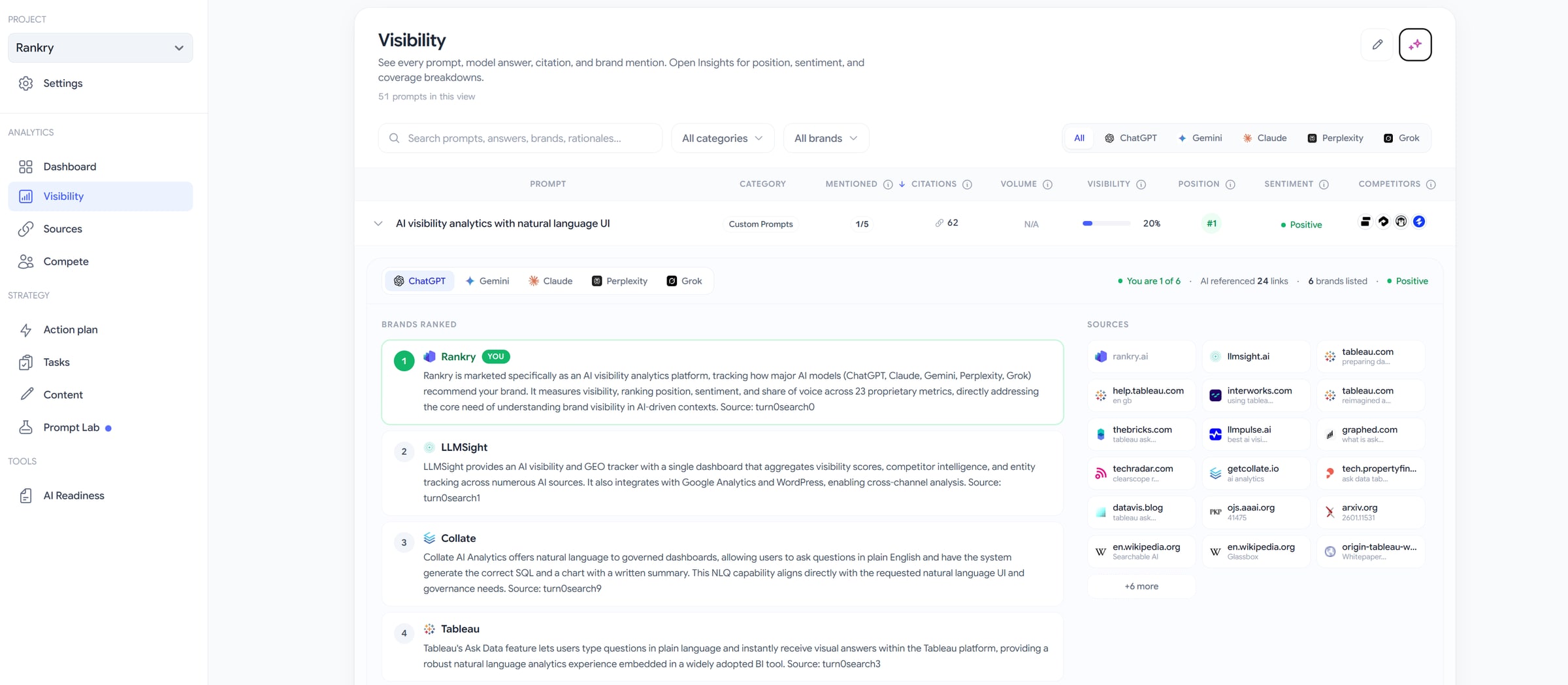
On our one winning prompt, the panel read “you are 1 of 6, AI referenced 24 links, 6 brands listed.” The ranked list was Rankry first, then LLMSight, Collate, Tableau, Clearscope, and Adthena, each with the model’s own rationale for why it belonged there and a citation showing where that judgment came from.
This is the part most tools never show you. It is one thing to know a competitor beat you. It is another to read, in the model’s own words, that it ranked them because of a specific capability described on a specific page. That sentence is your to-do list. It tells you exactly what narrative you would need to earn to change the answer.
Alongside it sits the Sources panel: the actual domains the model leaned on for that prompt. Zoom out to the whole scan and the picture is stark — competitor domains fill 14 of the top 20 citation sources, and our own domain’s share is 0%. When the sources are almost entirely other people’s domains, you have found the reason you are losing, and where to go fix it.
See each engine on its own
The five models do not agree, so the tab lets you read them separately. The same prompt answered by ChatGPT looks nothing like the same prompt answered by Gemini or Claude.
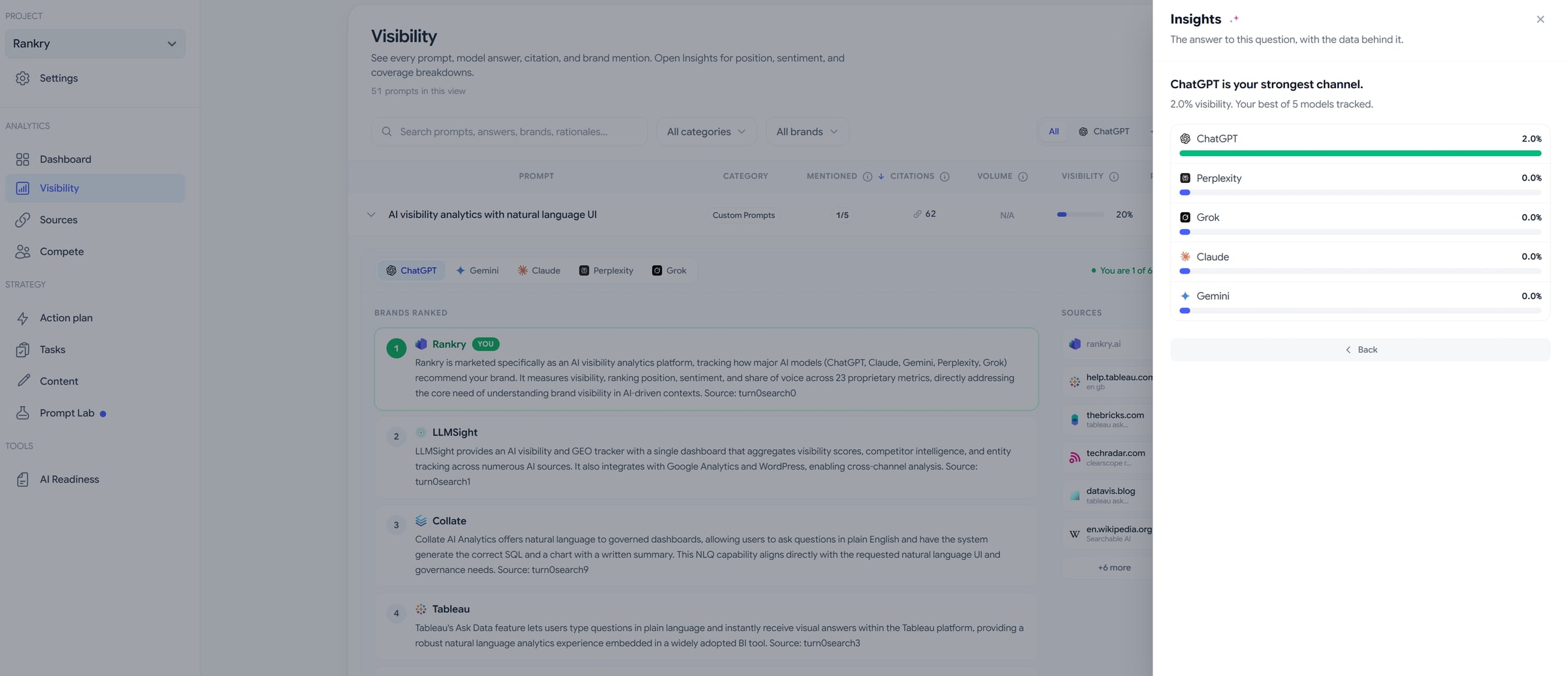
Ours made that brutally clear. Broken out by engine, ChatGPT gave us 2.0% visibility and was flagged as our strongest channel. Perplexity, Grok, Claude, and Gemini all sat at 0.0%. “Strongest” is doing a lot of work in that sentence — it means one mention on one engine — but the point stands: there is no such thing as your AI visibility in general. There is your visibility on ChatGPT, which is a different number and a different fix from your visibility on Perplexity. Averaging them into one figure just hides which battle to fight first.
Insights: from a table to answers
A table of fifty-one prompts across five models is a lot to stare at. The Insights panel turns it into plain questions with the data behind each one, grouped into Visibility, Positioning, Sentiment, and Diversity.
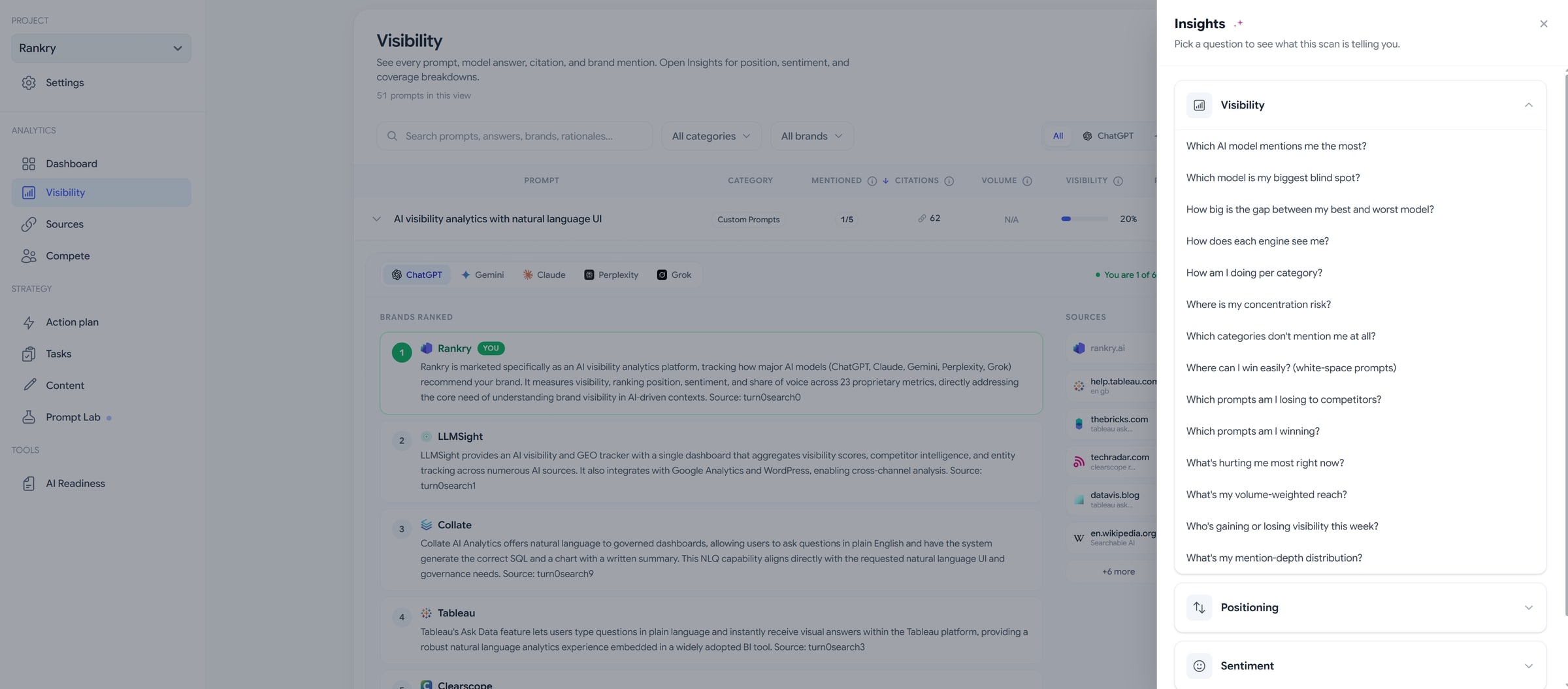
Instead of hunting through rows, you pick the question you actually have. Which model is my biggest blind spot. Where can I win easily, meaning the white-space prompts where nobody is strong yet. Which prompts am I losing to competitors. Where is my concentration risk, if all your visibility leans on a single prompt or a single model. Each one answers from your live scan, not from theory.
This is the difference between data and insight. The table shows you everything. Insights tells you the few things worth doing something about this week.
Notes: catch the hypothesis while you see it
When you spot a pattern, you can pin a note to the project right there, a thought, a hypothesis, a reminder, kept as a sticker on the scan. It is a small thing that matters in practice, because the useful realization almost always arrives while you are staring at the data, and it is gone an hour later if you do not write it down.
Where it leads
The Visibility tab is diagnosis. It tells you which prompts and which models are costing you, and it hands you the model’s own reasoning for why. The next step, turning that into a sequence of fixes, lives in the Action plan, which we will cover later in this series.
For us, the read was clear and a little painful: win our own name, lose the category. One mention in 255 responses, every buyer-intent prompt at zero, one engine barely registering, and competitors like Semrush and Profound owning the questions our customers actually ask. That is the map we are now working from, in public.
Next in the series we open the Sources tab, where you find out which domains are quietly writing your category’s story in AI, and which citation gaps are keeping you out of it.