You can check whether ChatGPT and Perplexity use your website as a source in three ways: ask the engines questions in your category and see if they cite your domain, read your server logs and analytics for AI crawler activity and AI referral traffic, and use an AI visibility tool that tracks cited sources automatically. If your domain never appears as a citation and AI bots are not crawling your pages, you are not a source yet, and that is a fixable problem.
This matters because being cited is how AI sends you both trust and traffic. When ChatGPT or Perplexity points to your page as the basis for an answer, you get a referral visit and a credibility signal at once. When it never does, you are invisible in exactly the moment a buyer is deciding. The good news is that “are we a source” is a question you can answer today.
The three ways to check
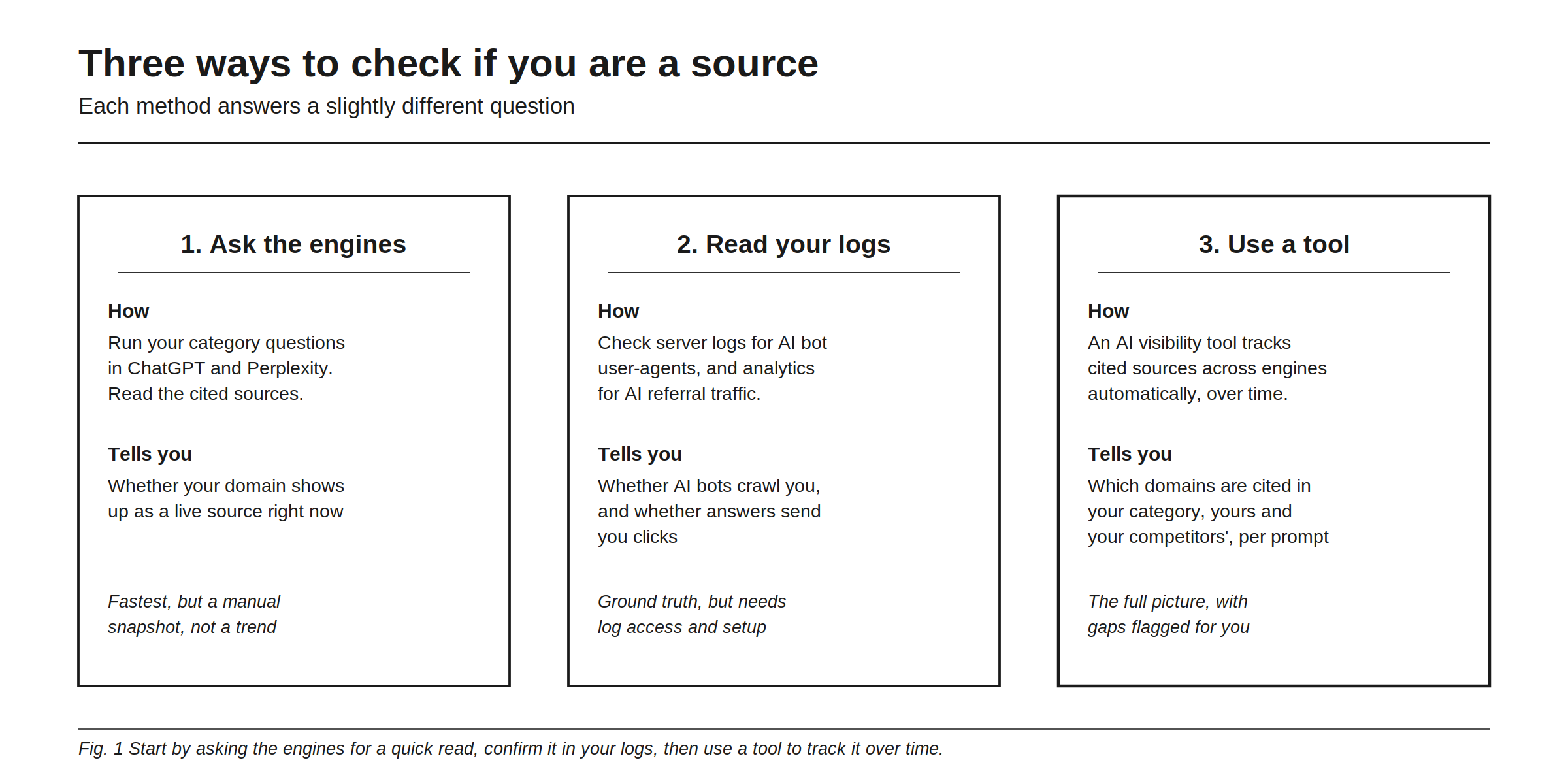
Each method answers a slightly different question, and together they give you the full picture. Asking the engines tells you whether your domain shows up as a live source right now. Reading your logs tells you whether AI bots are crawling you at all and whether AI answers are sending clicks. Using a tool tells you which domains are cited across your category, yours and your competitors’, tracked over time. Start with the quick manual check, confirm it in your logs, then automate it.
Method 1: ask the engines directly
The fastest check takes ten minutes. Open ChatGPT with browsing and Perplexity, and ask the real questions a buyer in your category would ask, things like “what are the best tools for X” or “how do I solve Y.” Then look at two things in each answer: whether your brand is named, and whether your domain appears in the cited sources, usually shown as numbered links or a sources panel.
Three outcomes are possible. Your domain is cited, which means you are already a live source. Your brand is mentioned but your domain is not cited, which means the model knows you exist but is trusting someone else’s page about you. Or you do not appear at all, which means you are outside the answer entirely. Each points to different work, and you will not know which one you are in until you look.
One caution: AI answers vary between runs and can be personalized, so check from a clean session and ask the same question a few times rather than trusting a single response.
Method 2: read your server logs and analytics
The engines can tell you what they show a user. Your logs tell you the ground truth of what the bots actually did. There are two trails to follow.
The first is crawler activity in your server logs. AI engines send named bots to read your pages, and you can search your logs for their user-agents.
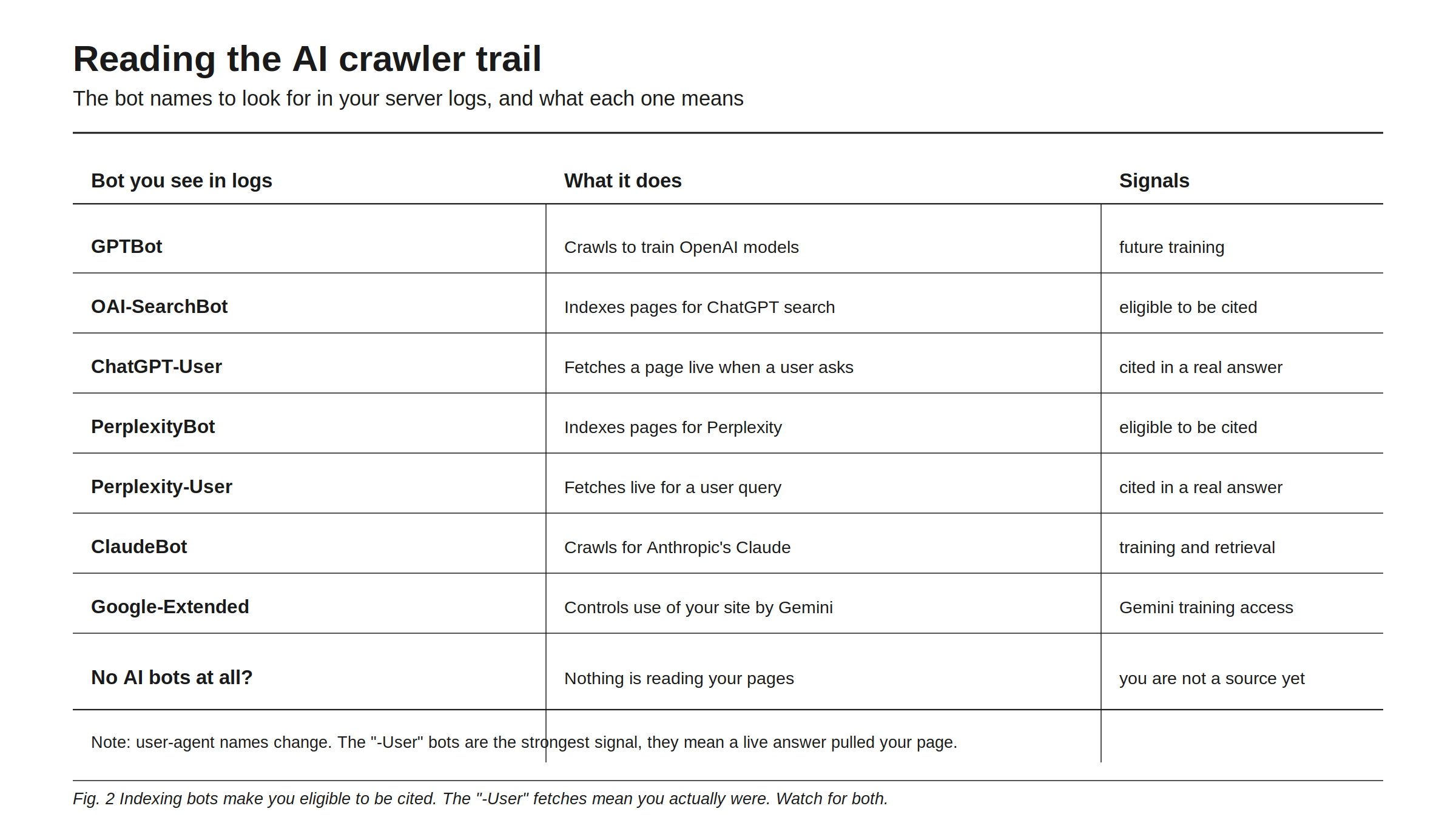
Two engines are missing from that list because they do not send a crawler of their own, and that trips teams up. Microsoft Copilot grounds its answers in the Bing index, so the bot to look for is bingbot, and if Bing has not indexed a page, Copilot cannot cite it no matter how good the page is. Google AI Overviews are assembled from the regular Google index, so Googlebot is the crawler that matters and there is no separate AI opt-in to find in your logs. Google-Extended is worth knowing here as well, but it governs whether your content is used for Gemini training and grounding, not whether you can appear in AI Overviews, so blocking it does not take you out of them.
There is an important distinction in that list. Indexing bots like OAI-SearchBot and PerplexityBot crawl your pages so you are eligible to be cited later. The “-User” bots, like ChatGPT-User and Perplexity-User, fetch your page live at the moment someone asks a question, which means a real answer pulled you in. Seeing the indexing bots is good. Seeing the “-User” bots is better, because it means you were actually used. Seeing no AI bots at all means nothing is reading your pages, and you should check that you are not blocking them in robots.txt. For the full breakdown of which bots to allow, see should you allow or block AI crawlers.
The second trail is referral traffic in your analytics. When a citation sends a visitor, that visit arrives with a referrer like chatgpt.com or perplexity.ai. A lot of it hides in direct or unattributed traffic, so set up a dedicated AI referral segment to surface it. If you see AI referrals climbing, you are being cited and clicked. For how to capture this properly, see tracking AI referral traffic from ChatGPT and Perplexity.
Method 3: use an AI visibility tool
Manual checks are a snapshot, and logs are technical and noisy. A tool gives you the durable version: it runs your category prompts across the engines on a schedule, records which sources each answer cites, and shows you the cited domains in your niche over time, including which ones name a competitor but not you. That last part is the actionable gold, because it hands you the exact pages to go earn a place on.
This is what Rankry’s Sources view does. It tracks citations per prompt and per model across ChatGPT, Claude, Gemini, Perplexity, Grok, Microsoft Copilot, and Google AI Overviews, labels each cited domain by type, and flags the gaps where a rival is cited and you are absent. Reading your tracked engines together is what makes the source list actionable, because a domain that cites a rival on four engines out of five is a far better use of your outreach time than one that carries a single citation on one.
What to do if you are not a source yet
If the checks come back empty, work in this order. First, make sure you are crawlable: confirm you are not blocking AI bots and that your content renders without requiring scripts. Second, make your pages worth citing: clear, specific, answer-first content on the exact questions buyers ask. Third, and most important, get named on the third-party pages AI already trusts in your category, because much of what gets cited is not your own site but Reddit threads, listicles, and review pages. Then re-run the checks and watch the cited sources change. The deeper playbook is in how to get cited by AI.
FAQ
How do I know if ChatGPT uses my website as a source? Ask ChatGPT a question in your category with browsing on and check whether your domain appears in the cited sources. Then confirm in your server logs whether ChatGPT’s bots, especially ChatGPT-User, are fetching your pages.
What is the difference between GPTBot and ChatGPT-User? GPTBot crawls your site to train future OpenAI models. ChatGPT-User fetches your page live when a user or agent asks a question, which means your page was actually used in a real-time answer. The “-User” visit is the stronger signal.
Why is my site crawled by AI bots but never cited? Being crawled makes you eligible to be cited, but the model still chooses the most relevant, trusted source for each answer. If you are crawled but not cited, the issue is usually content that does not directly answer the question, or weaker third-party signals than your competitors.
How do I see AI referral traffic in Google Analytics? Create a segment or channel that captures referrers like chatgpt.com and perplexity.ai. Much of this traffic is otherwise grouped into direct or unassigned, so it stays invisible until you isolate it.
Can I check if I am a source for free? Yes. Asking the engines directly and reading your server logs cost nothing. A tool adds automated tracking over time and shows competitor citations alongside yours.
What about Claude, Gemini, Grok, Copilot, and Google AI Overviews? The same three checks apply, only the bot names and the referrers change. Claude sends ClaudeBot and Claude-User, Gemini grounding is governed by Google-Extended, Microsoft Copilot grounds on the Bing index so the crawler to look for is bingbot, and Google AI Overviews are built from the regular Google index, which means Googlebot is the relevant crawler and there is no separate opt-in. Being a source on one engine does not make you a source on the others, so check each.
See exactly which sources ChatGPT, Claude, Gemini, Perplexity, Grok, Microsoft Copilot, and Google AI Overviews cite in your category, and where you are missing. Start a free 7-day Rankry trial, no card, first report in two minutes.