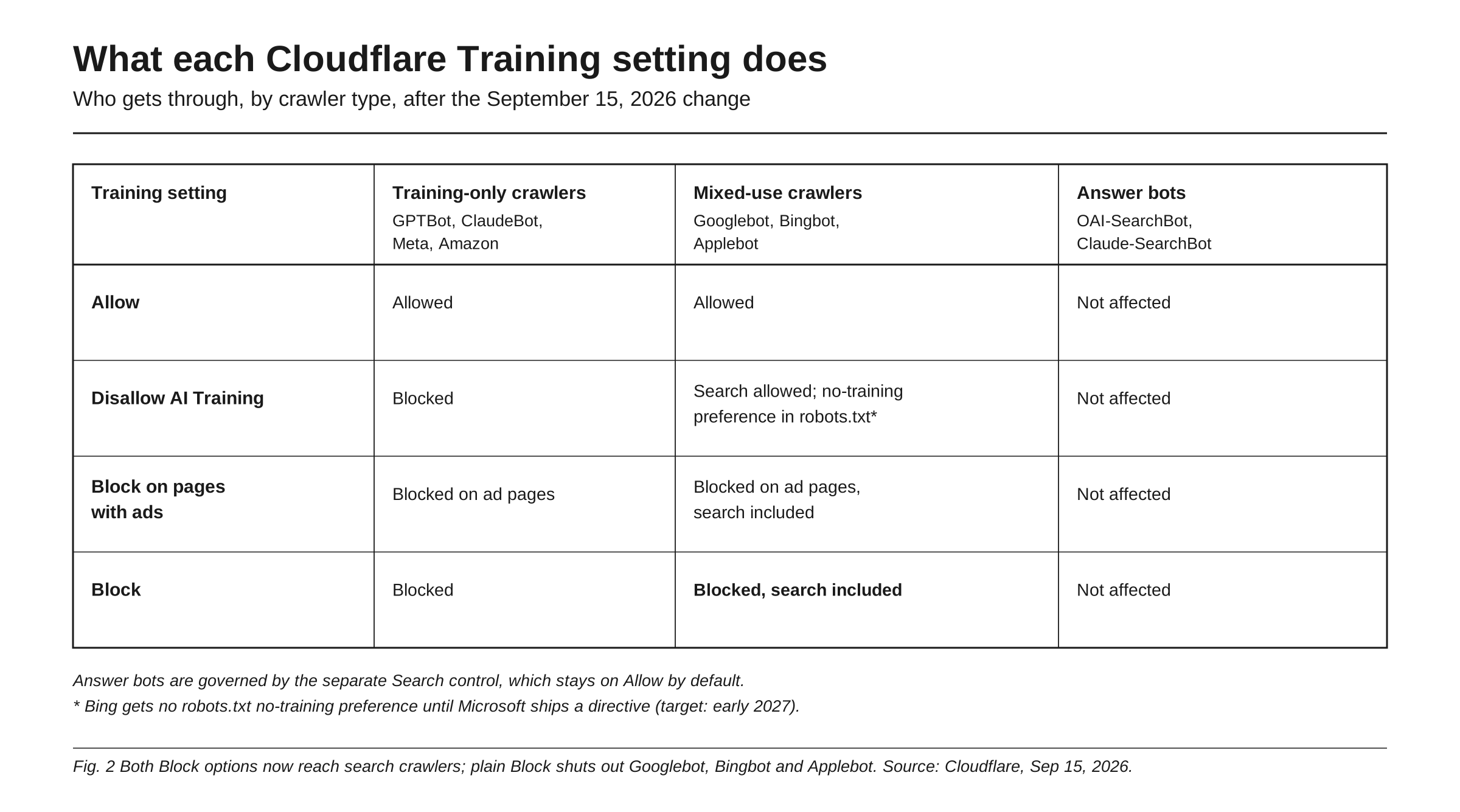
Cloudflare’s AI training block stops crawlers that collect content to train models, such as GPTBot, ClaudeBot and the training crawlers run by Amazon and Meta, and since September 15, 2026 the recommended way to apply it is a setting called Disallow AI Training. It does not block the search crawlers that put you into AI answers, such as OAI-SearchBot and Claude-SearchBot, which sit under a separate Search control that stays allowed by default. It also leaves Googlebot crawling, so it does not by itself remove you from Google’s AI Overviews. The risk lives in the neighboring options: plain Block on Training now stops Googlebot, Bingbot and Applebot entirely, search included, and the Agent control can refuse chat fetch bots such as ChatGPT-User when a person asks an assistant to read your page. Check all three controls, then confirm in the logs that answer bots get 2xx responses.
On September 15, 2026, Cloudflare changed what “Block” means and migrated existing domains automatically. If you turned on the old “Block AI Bots” toggle and never used the newer controls, your site now has settings you never picked by name. For the general robots.txt question of which bots to allow, read should you allow or block AI crawlers.
What Cloudflare changed on September 15, 2026
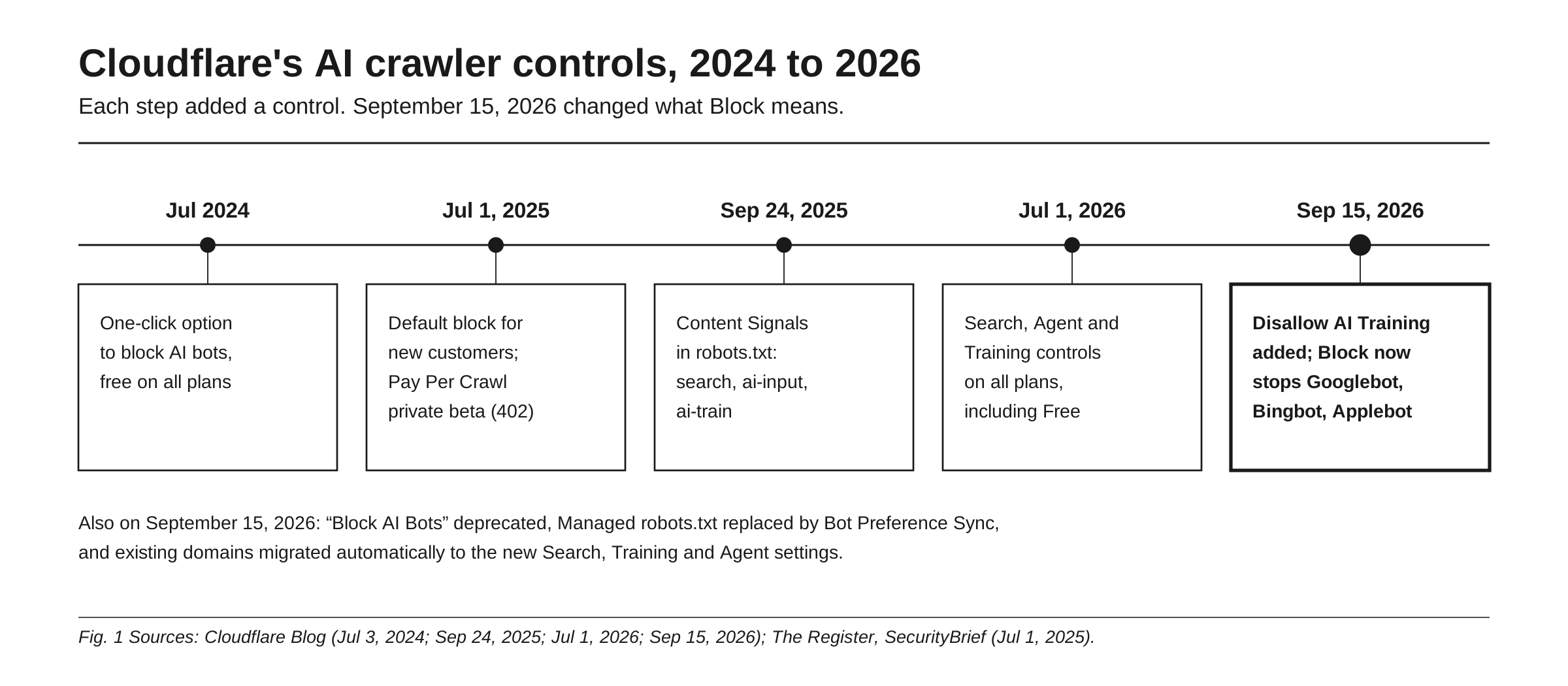
Cloudflare has expanded its AI crawler controls in steps. It added a one-click option to block AI bots, free on every plan, in July 2024. On July 1, 2025, it began blocking AI crawlers by default for new customers and launched Pay Per Crawl in private beta, which answers a crawler with “402 Payment Required” unless it presents payment intent. On September 24, 2025, it published the Content Signals Policy, which adds preferences for three uses to robots.txt: search, ai-input and ai-train. On July 1, 2026, it added three controls, Search, Agent and Training, on every plan including Free, alongside the legacy toggle.
The September 15, 2026 post, “Have it both ways,” does four things:
- Adds Disallow AI Training. It publishes a no-training preference in robots.txt, keeps “Accountable” mixed-use crawlers allowed for search, and blocks every other training crawler, “including the training-only crawlers run by Amazon, Anthropic, Meta, and OpenAI.”
- Extends Block and Block on pages with ads to mixed-use crawlers, including Applebot, Bingbot and Googlebot. In Cloudflare’s words: “If you want mixed-use crawlers gone entirely, you now have to say so.”
- Deprecates “Block AI Bots” in favor of the three controls, and deprecates Managed robots.txt in favor of Bot Preference Sync.
- Migrates existing domains on its own. A domain that never used the granular controls and had the legacy “Block AI” setting on Block or Block on pages with ads now reads Search: Allow, Training: Disallow AI Training, Agent: Block on pages with ads. Domains that had set the granular controls keep Search and Agent, and a Training Block becomes Disallow AI Training.
Scale is why this matters. Cloudflare says it sits in front of more than 20% of web domains, and reports that fewer than 1% of its sites block Search bots while 17% enable some mechanism to block training.
What the training block actually blocks
Cloudflare sorts AI traffic by behavior. Training covers crawlers that collect content to train or fine-tune a model. Search covers crawlers that build an index to answer later queries. Agent covers “user-directed agents visiting a page on behalf of a human, such as chat fetch bots and browser-use agents.” How individual bots map onto these behaviors follows the taxonomy in the five types of AI bots.
The Training control has four options. Allow lets training crawlers in. Disallow AI Training blocks training crawlers other than Accountable mixed-use ones and, through Bot Preference Sync, publishes a no-training preference in robots.txt. For Google and Apple, the documented opt-out is a Disallow rule for Google-Extended and Applebot-Extended, while Googlebot and Applebot keep crawling for search. Block on pages with ads blocks training crawlers, mixed-use ones included, on any page Cloudflare detects as serving ads. Block stops all of them everywhere.
Cloudflare’s bot reference labels GPTBot, ClaudeBot, Meta-ExternalAgent, Amazonbot, Bytespider and CCBot as “AI Crawler.” Amazon, Anthropic, Meta and OpenAI separate their search and training crawlers, so Cloudflare can block the training crawler without affecting search. OpenAI states that “Disallowing GPTBot indicates a site’s content should not be used in training generative AI foundation models.”
What it does not block
Five things pass through Disallow AI Training, the training block Cloudflare now recommends.
Answer and search crawlers. Because OpenAI and Anthropic run separate search crawlers, a training block does not touch OAI-SearchBot or Claude-SearchBot; they sit with the Search control, which stays on Allow unless you change it. Cloudflare’s bot reference lists both, along with PerplexityBot, as “AI Search,” and Perplexity says PerplexityBot “is not used to crawl content for AI foundation models.”
Googlebot, and with it AI Overviews. Google’s documentation says AI is built into Search, that robots.txt rules for Googlebot are the control for how a site is crawled for Search, and that nosnippet, data-nosnippet, max-snippet and noindex limit what appears. Google-Extended limits “AI training and grounding in some of Google’s other systems,” and per Cloudflare’s post, Google states that disallowing it does not impact search ranking. Disallow AI Training leaves Googlebot free to crawl, so it is not a way out of AI Overviews.
Bing training, for now. Microsoft is targeting early 2027 for a robots.txt no-training directive. Until then, Disallow AI Training will not pass a no-training preference to Bing through robots.txt; Bing’s current mechanism is the NOARCHIVE meta tag.
Bots that ignore signals. Content signals “express preferences,” and Cloudflare warns that “Some companies might simply ignore them.” In August 2025 it reported that Perplexity used an undeclared crawler impersonating Chrome on macOS, at 3 to 6 million requests per day alongside 20 to 25 million from its declared crawler, and de-listed Perplexity as a verified bot. On the Free plan, AI Crawl Control identifies crawlers by user agent string only.
User-triggered fetches. Cloudflare places chat fetch bots such as ChatGPT-User under the Agent control, not Training, and Claude-User and Perplexity-User do the same job for their assistants. OpenAI says “robots.txt rules may not apply” to ChatGPT-User, and Perplexity says its user fetcher “generally ignores robots.txt rules.” A Cloudflare edge block can still stop the declared ones, which is where the real risk sits.
Three ways to remove yourself from AI answers by accident
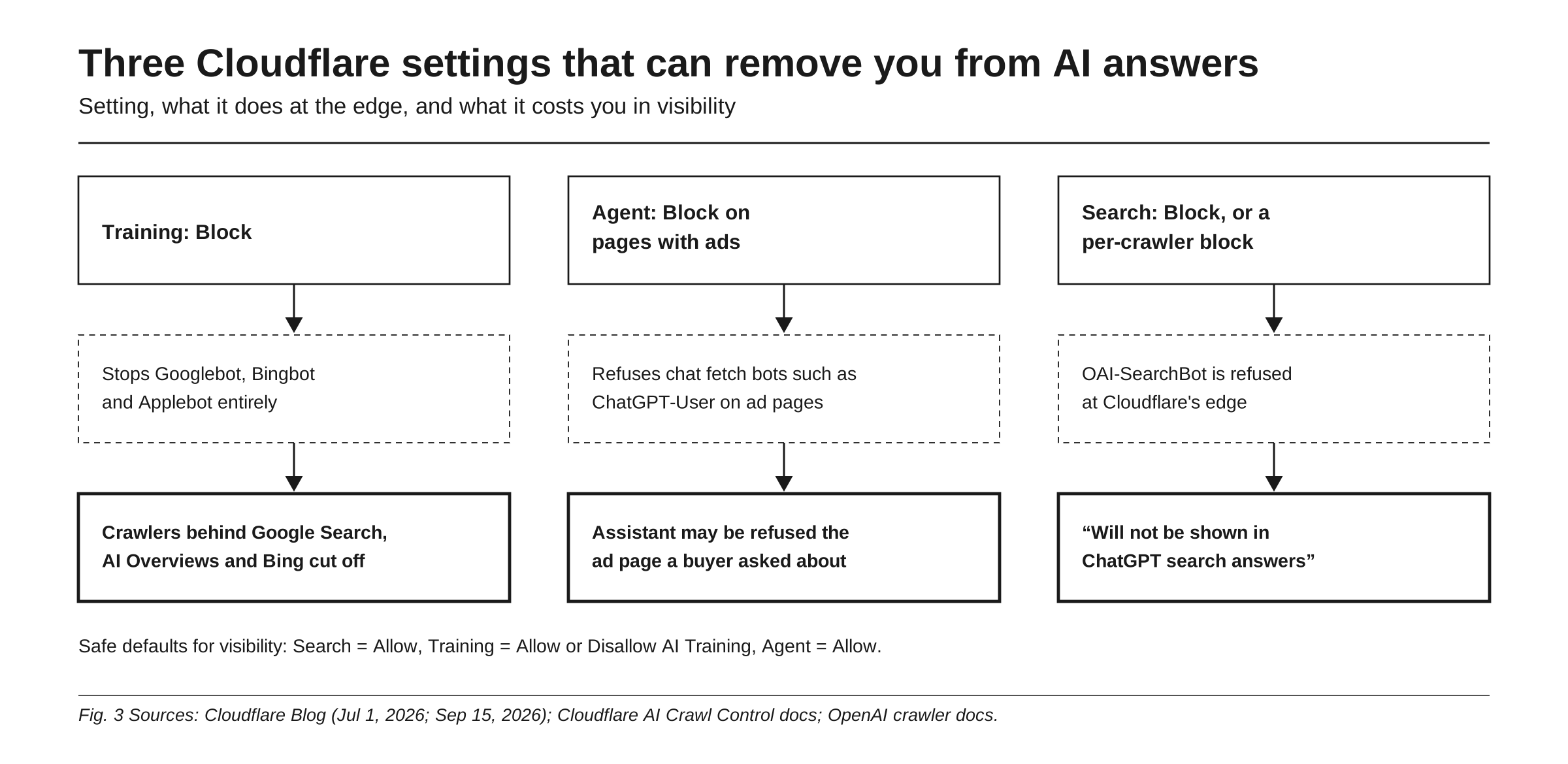
Choosing Block instead of Disallow AI Training. Before September 15, Block “did not apply to mixed-use crawlers because blocking them could also affect search discoverability.” Now it does: Block “will stop Applebot, Bingbot, and Googlebot from reaching your site,” search included. A team that picks the strongest-sounding option shuts out the crawlers behind Google Search, AI Overviews and Bing in one click.
Leaving Agent on Block on pages with ads. This is the migrated value for domains that never used the granular controls and had the legacy “Block AI” setting on, and the recommended preset for new ad-supported domains. Cloudflare names ChatGPT-User as an example of the chat fetch bots Agent covers, and its bot reference puts Claude-User and Perplexity-User in the same “AI Assistant” category. Anthropic states that disabling Claude-User “prevents our system from retrieving your content in response to a user query.” A buyer pastes your URL into an assistant, and on a page Cloudflare detects as serving ads, the fetch can be refused.
Blocking Search or a single answer bot. A Block on the Search control, or a per-crawler Block on OAI-SearchBot in AI Crawl Control, cuts that engine’s search crawler off. OpenAI is direct: “Sites that are opted out of OAI-SearchBot will not be shown in ChatGPT search answers,” though they can still appear as navigational links. Per-crawler blocks are enforced through a WAF custom rule named AI Crawl Control. Whether ChatGPT can use you as a source at all is covered in is my website a source for ChatGPT.
How to audit your Cloudflare settings for AI visibility
Run this now, since the migration may have changed values you never touched, and again after any policy change.
- Open your domain’s Security Settings and find the controls for Search, Training and Agent. Record each current value before changing anything.
- Set Search to Allow. Fewer than 1% of Cloudflare sites block it, and blocking it cuts off the search crawlers that answer engines rely on.
- Pick Training deliberately: Allow, or Disallow AI Training if you want out of model training. Avoid Block unless you intend to leave Google, Bing and Apple search.
- Decide Agent on purpose. Block on pages with ads refuses chat fetch bots on every page Cloudflare detects as serving ads. For most B2B and SaaS sites, Allow is the sensible default, because these fetches happen when a person asks an assistant about your page.
- In AI Crawl Control, open the Security tab and the Crawlers table. Confirm OAI-SearchBot, Claude-SearchBot, PerplexityBot, ChatGPT-User, Claude-User and Perplexity-User are set to Allow, not Block or Charge.
- Review WAF custom rules for legacy user-agent rules matching strings like “bot,” “GPT” or “Claude.”
- Load your live /robots.txt and the Directives tab. With Bot Preference Sync on, Cloudflare prepends a block of User-agent and Disallow lines for the categories you block or disallow, including -Extended tokens for mixed-use crawlers. Confirm no Disallow line targets an answer bot.
- Verify in AI Crawl Control Metrics. Group by crawler and read the status code distribution: answer bots and user fetchers should get 2xx, not 403 or 402. OpenAI notes search-related robots.txt changes can take about 24 hours to take effect.
Confirm the outcome, not the setting
Cloudflare’s dashboard shows what happened at the edge. It does not show whether ChatGPT still names you when a buyer asks for a recommendation. Rankry covers that side. Its AI traffic tracking shows the visits ChatGPT, Perplexity and other AI platforms send to your site, as described in Introducing AI Traffic. Its daily tracking of a stable set of buyer-intent prompts across ChatGPT, Claude, Gemini, Perplexity, Grok and Google AI Mode shows whether your mentions and citations moved after a settings change. If a value changed during the migration, that history gives you a date to check it against.
FAQ
Does Cloudflare’s Disallow AI Training remove me from Google AI Overviews? No. Disallow AI Training publishes a no-training preference in robots.txt, which for Google is a Google-Extended opt-out, and leaves Googlebot crawling. Google says robots.txt rules for Googlebot and snippet controls such as nosnippet and noindex are the controls for its AI features in Search, and that Google-Extended limits training and grounding in some of Google’s other systems. To limit AI Overviews, use Google’s snippet controls, not Cloudflare’s training setting.
What is the difference between Block and Disallow AI Training on Cloudflare? Disallow AI Training blocks training-only crawlers and asks mixed-use crawlers like Googlebot not to train, while keeping them in for search. Block, since September 15, 2026, stops Applebot, Bingbot and Googlebot entirely, search included. If your goal is protecting content from training while staying findable, choose Disallow AI Training.
Did Cloudflare change my AI crawler settings automatically? Possibly. Cloudflare migrated existing domains on September 15, 2026. A domain that never used the granular controls and had the legacy “Block AI” setting on now shows Search set to Allow, Training set to Disallow AI Training, and Agent set to Block on pages with ads. That last value can refuse chat fetch bots such as ChatGPT-User on pages Cloudflare detects as serving ads, so check it.
Does blocking AI training on Cloudflare stop ChatGPT from citing my site? Not by itself. ChatGPT search relies on OAI-SearchBot, a search crawler OpenAI runs separately from GPTBot, so a training block does not touch it. On Cloudflare, the usual ways to cut it off are a Block on the Search control, a per-crawler block, or a WAF rule that matches it. A blocked Agent control can still stop ChatGPT-User from reading a page when a user asks about it.
Can bots ignore Cloudflare’s AI training block? Some do. Robots.txt preferences and content signals are requests, and Cloudflare warns some companies might ignore them. Its edge blocks stop crawlers it can identify, by user agent on the Free plan and with deeper detection on paid Bot Management. In 2025 Cloudflare documented Perplexity using an undeclared crawler that impersonated Chrome.
Sources
- Have it both ways: stay discoverable in search while disallowing AI training, Cloudflare Blog, September 15, 2026
- Your site, your rules: new AI traffic options for all customers, Cloudflare Blog, July 1, 2026
- New options to manage AI traffic, Cloudflare Changelog, July 1, 2026
- Cloudflare makes AI crawlers opt-in, giving power to creators, SecurityBrief, July 1, 2025
- Cloudflare creates AI crawler tollbooth to pay publishers, The Register, July 1, 2025
- Control content use for AI training with Cloudflare’s managed robots.txt and blocking for monetized content, Cloudflare Blog, July 1, 2025
- Giving users choice with Cloudflare’s new Content Signals Policy, Cloudflare Blog, September 24, 2025
- Perplexity is using stealth, undeclared crawlers to evade website no-crawl directives, Cloudflare Blog, August 4, 2025
- Bot reference, Cloudflare AI Crawl Control docs, April 23, 2026
- Manage AI crawlers, Cloudflare AI Crawl Control docs, July 28, 2026
- Analyze AI traffic, Cloudflare AI Crawl Control docs, April 23, 2026
- Directives, Cloudflare AI Crawl Control docs, April 23, 2026
- Overview of OpenAI crawlers, OpenAI, n.d.
- Does Anthropic crawl data from the web, and how can site owners block the crawler?, Anthropic, n.d.
- Perplexity crawlers, Perplexity, n.d.
- AI features and your website, Google Search Central, December 10, 2025
- Declare your AIndependence: block AI bots, scrapers and crawlers with a single click, Cloudflare Blog, July 3, 2024
- Say it once: introducing Bot Preference Sync, Cloudflare Blog, August 21, 2026
- AI Crawl Control with Cloudflare WAF, Cloudflare AI Crawl Control docs, August 3, 2026
See whether your Cloudflare settings are costing you mentions and citations in ChatGPT, Claude, Perplexity and Google AI Mode, day by day. Start a free 7-day Rankry trial, no card required.