Sometimes, but nothing Google offers guarantees it. Google publishes no turnaround time for AI Overview corrections, and its documentation says that after you request a recrawl, crawling “can take anywhere from a few days to a few weeks.” The fastest documented fix we found is one case published by Semrush on October 21, 2026: Feature Upvote corrected outdated pages on its own site, requested indexing, and the AI Overview flipped to the right answer within an hour for one phrasing, then took a few more days to answer correctly across phrasings. That is the pattern to plan around: fixes can be fast when the wrong fact lives on a page you own, and slower when it lives on someone else’s. Feedback, Business Profile, Knowledge Panel and legal requests help in specific cases, while the Search generative AI control and nosnippet remove your site from the answer instead of correcting it.
A wrong AI Overview reads like Google’s own answer, and it repeats every time someone asks. The useful news is that it often traces to a page somebody can edit.
What Google has said about speed, and what it hasn’t
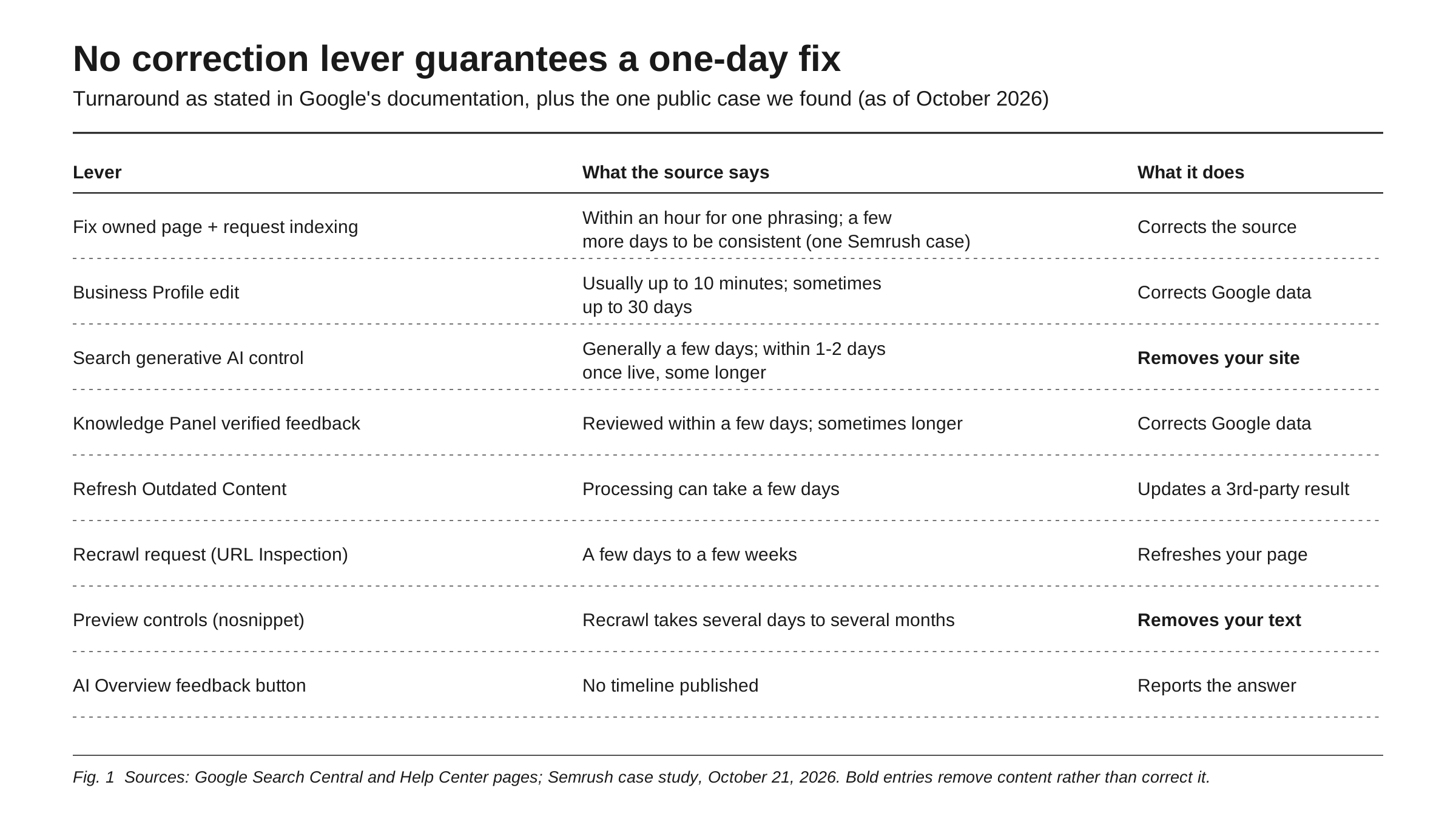
Google has published no service level for correcting an AI Overview. It has published timelines for the systems underneath, none guarantees a fix within a day, and none says how fast an AI Overview picks up the change:
- Recrawling a changed page: “a few days to a few weeks,” with no guarantee of inclusion “instantly or even at all,” and repeat requests “won’t get it crawled any faster.” For preview controls, Google says “several days to several months.”
- Business Profile edits: “usually take up to 10 minutes to review, but sometimes it can take up to 30 days.”
- Knowledge Panel feedback: Google “reviews feedback from verified users within a few days,” and says this can sometimes take longer.
- Refresh Outdated Content for pages you do not own: processing “can take a few days.”
- Excluding your site with the Search generative AI control: Google’s help page says it “generally takes a few days,” with content excluded “within 1-2 days after the control goes live” and some taking longer.
- The AI Overview feedback button: no timeline at all.
The only documented same-day fix we found is the Feature Upvote case, written up by Tan Siew Ann on the Semrush blog. In July 2026, a week after launching a public REST API, founder Steve McLeod found an AI Overview saying the product had no REST API. The source was “a couple of really old blog posts” on his own site. He had announced the API in a blog post, an X post and a newsletter on July 24. On July 28 he corrected the outdated pages and submitted them, along with his new API pages, for indexing, and within an hour the AI Overview answered “Yes” to “does feature upvote have an api?” Other phrasings still returned the old answer, and “it took a few more days for the AI Overview to consistently give the right answer.” On September 10, it was still right, now citing different pages.
Read it for what it is: one case, reported by a vendor that sells AI tracking, about a B2B SaaS company whose wrong fact lived on its own pages. It shows a one-day fix is possible, not typical. The same piece cites Semrush’s own guidance that fixes can take weeks to months.
Why the wrong fact is there: AI Overviews repeat their sources
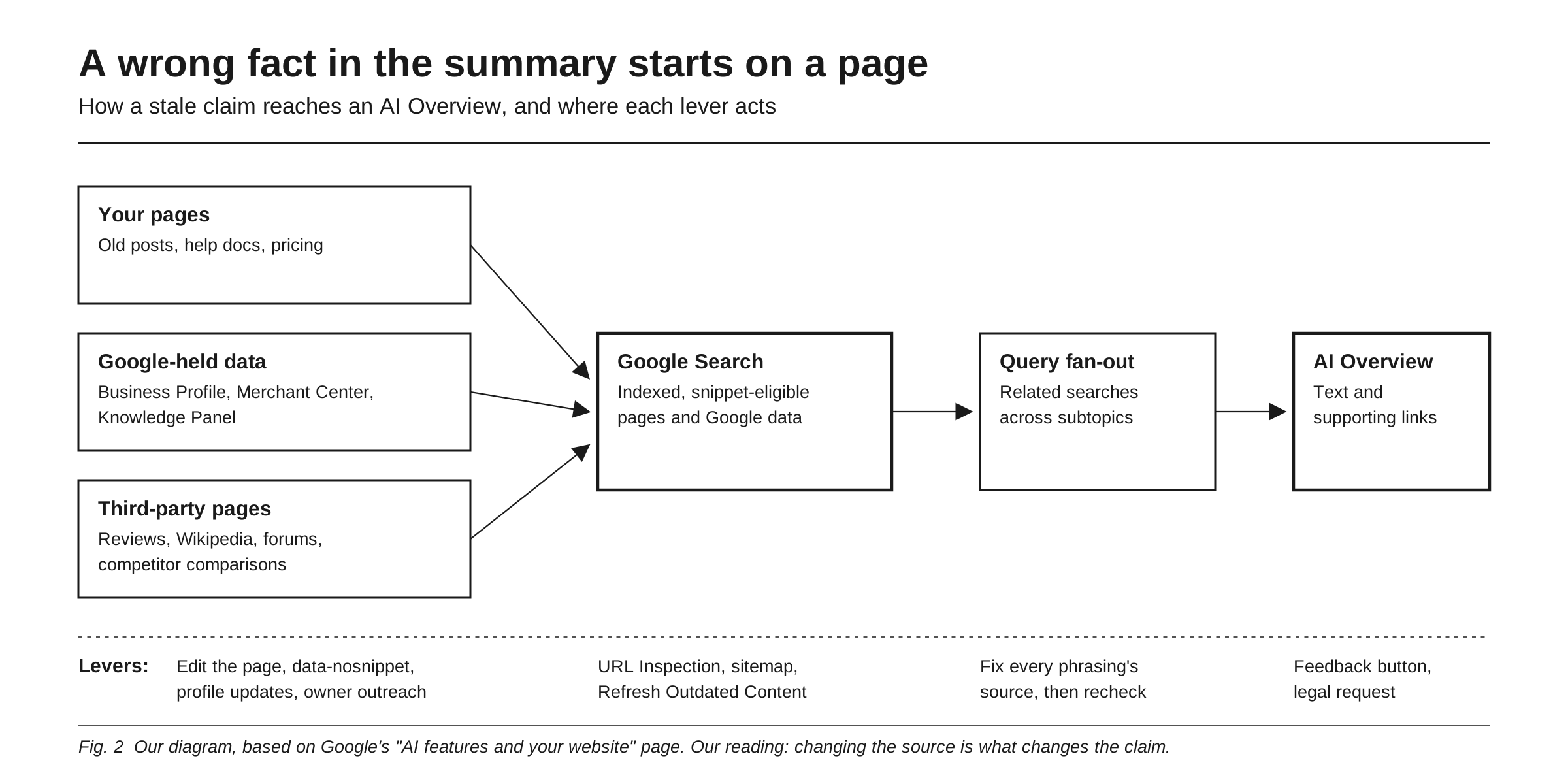
To appear as a supporting link, Google says a page must be “indexed and eligible to be shown in Google Search with a snippet,” and AI Overviews may use “query fan-out,” issuing multiple related searches across subtopics and data sources. Our inference: the wrong sentence usually traces to an indexed page that says it, such as an old post of yours, a stale review profile, a competitor’s comparison page or an outdated Business Profile field. Not always: in May 2024 Google said that in a small number of cases overviews misinterpreted language on webpages. Fan-out also fits the Feature Upvote pattern, in our reading: different phrasings can pull different pages, so one query is fixed while its neighbor still repeats the error.
An Ahrefs study, from a vendor that sells AI visibility tracking, adds a nuance. Across more than 43,000 keywords, each with at least 16 recorded AI Overviews over one month, it found a 70% chance the content changed between consecutive observations, an average persistence of 2.15 days, and, on average, 45.5% of cited URLs new from one observation to the next. Yet the meaning held: consecutive answers scored 0.95 out of 1.0 for semantic similarity. Our reading: the wording churns, but the underlying claim stays put until the sources change, so waiting for a refresh is unlikely to flush out a wrong fact its sources still support.
This is the Google version of the problem in how to find and fix a wrong AI description: trace the fact to the page the system read, and fix it there.
The levers, and what each one actually does
Fix the page you own. The fastest lever, fully in your control. Correct the statement everywhere on your site, including old posts, changelogs and help articles, and state the right fact plainly in indexable text. If an old passage must stay, the data-nosnippet attribute on span, div and section elements keeps it out of snippets.
Request a recrawl. Use URL Inspection in Search Console to request indexing for each corrected page, or a sitemap for many URLs. You must be an owner or full user of the property, there is a quota, and “you can’t request indexing for URLs that you don’t manage.” Confirm Google has the corrected version: Feature Upvote found its announcement post had not been indexed. The Removals tool’s “Clear snippet in search” option wipes a page’s snippet until reindexing; Google does not say how it affects AI Overviews.
Send feedback on the AI Overview. Click thumbs down at the bottom of the overview (or use the three-dot menu), choose “Report a problem,” pick a category and describe the error with the correct fact. The report includes your most recent query and its results. Google promises no outcome. In May 2024 it said it addressed inaccurate overviews “either through improvements to our algorithms or through established processes to remove responses that don’t comply with our policies,” which reads as a quality and policy channel, not a correction desk for brand facts.
Update Google’s own data about you. Google’s AI features guidance includes “Checking that your Merchant Center and Business Profile information is up-to-date.” If your brand has a Knowledge Panel, claim it and submit verified feedback through “Suggest edits,” with public URLs that support the change.
Fix third-party pages. Update review profiles you control, ask site owners for corrections, and on Wikipedia propose changes on the talk page, since its conflict-of-interest guideline strongly discourages editing affected articles directly. Once a page has been removed or significantly changed, the Refresh Outdated Content tool can ask Google to update its search result; Google says it is not for information still on the live page, and it does not say how the tool affects AI Overviews.
Escalate when the law is involved. Google’s legal form covers content you believe “violates the law or your rights,” which Google will review and may block, limit or remove. It is not a channel for a wrong price.
Know what removes you instead. The Search generative AI control, rolled out to all sites as of August 31, 2026, can exclude your links and content from AI Overviews, AI Mode and generative AI features in Discover, but its help page states that “content from other sites will still be available in those features.” nosnippet “will also prevent the content from being used as a direct input for AI Overviews and AI Mode.” Both silence your correct pages and leave the wrong source talking. Google’s broader guidance is unpacked in what Google’s own AI search guide says you don’t need.
The triage playbook, ordered by speed and control
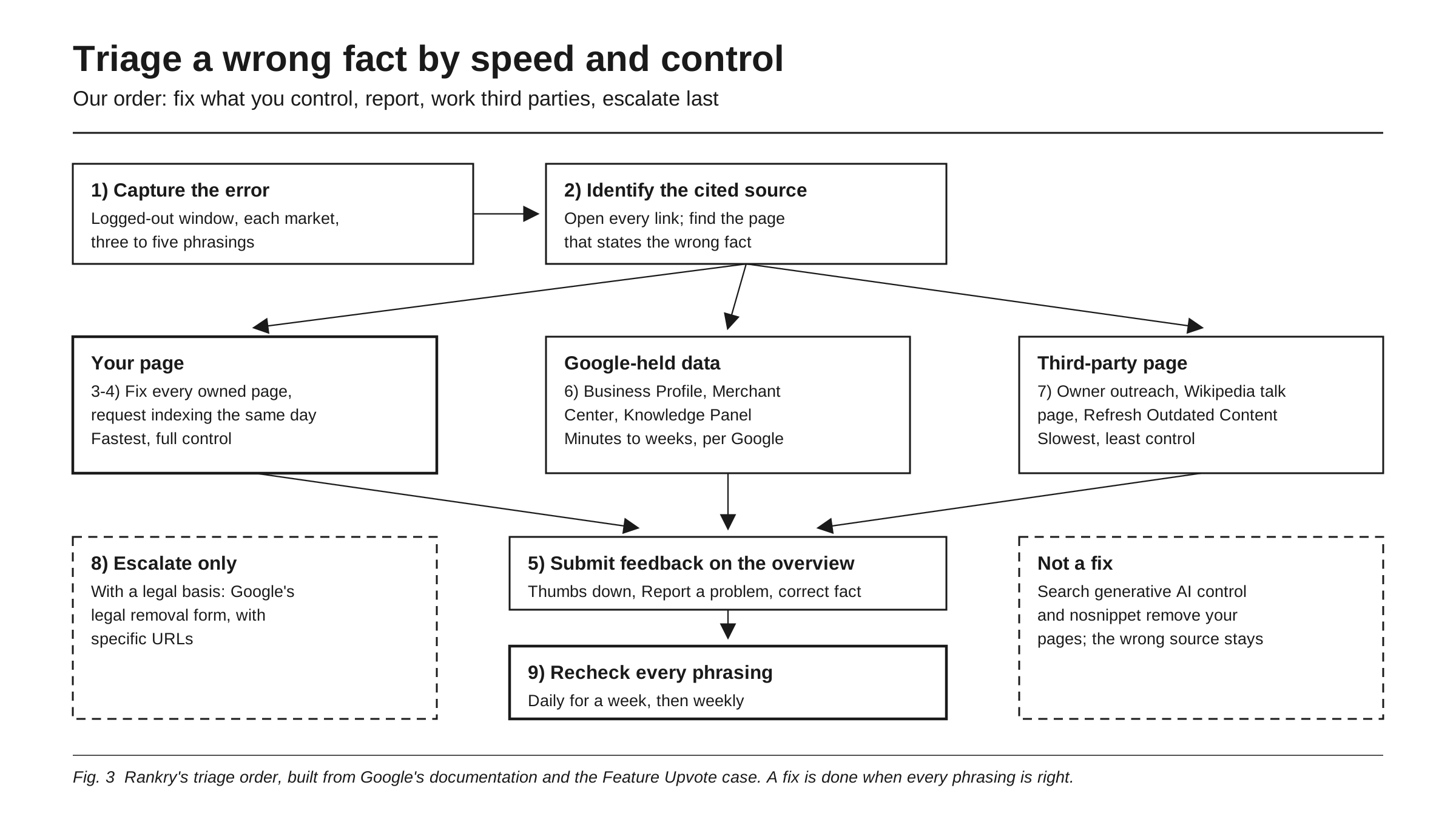
This is our triage order, built from Google’s documentation and the one public case: fix what you control, report, work the third parties, escalate last.
- Capture the error. Search the exact query in a logged-out, private window in each market you sell in. Screenshot it, copy the text, note the date. Try three to five phrasings, since each can return a different answer.
- Identify the cited source. Open every link and find the page stating the wrong fact. Classify it: your site, Google-held data (Business Profile, Merchant Center, Knowledge Panel), or a third-party page.
- Fix every owned page, same day. Correct the cited page and every other page that repeats the error. Put the correct fact in a plain sentence near the top of the most relevant page, in the words people search with.
- Request indexing, same day. URL Inspection for each corrected page, a sitemap for the rest. Check that the corrected HTML is what Google fetched.
- Submit feedback. Thumbs down, Report a problem, the correct fact, and the corrected page’s URL.
- Update Google-held data. Business Profile for address, hours and contact details; Merchant Center for product data; verified Knowledge Panel feedback for entity facts.
- Work the third-party sources. Profiles, owner outreach, Wikipedia talk pages, then Refresh Outdated Content once a page has changed significantly.
- Escalate only with a legal basis, through Google’s legal removal form, with specific URLs.
- Recheck daily for a week, then weekly. Same phrasings, same conditions. A fix is done when the overview gives the right fact across phrasings, not when your page changes.
Set expectations accordingly. If the wrong fact lives on your site, a same-day improvement is possible. If it lives on a third-party page, you depend on someone else’s schedule, so plan for longer. Keep your branded queries on a regular audit too, as described in AI Overviews on branded searches.
How Rankry fits
A wrong fact in an AI Overview rarely shows up in analytics; it shows up in a sales call. Rankry tracks how Google AI Overviews and AI Mode, along with ChatGPT, Claude, Gemini, Perplexity and Grok, mention, rank, cite and recommend your brand on a stable set of buyer-intent prompts, every day, so a new error or a new source behind it appears as a change in your data. Other phrasings of a fact question can be added as prompts and are answered right away while a fix lands.
FAQ
Can I get Google to fix a wrong AI Overview in a day? Sometimes, but nothing guarantees it. Google publishes no turnaround for AI Overview corrections and says recrawling can take a few days to a few weeks. The one public same-day case we found, Feature Upvote in July 2026, involved wrong facts on the company’s own pages. After it corrected them and requested indexing, one phrasing flipped within an hour, and others took a few more days.
Does the thumbs-down feedback button fix the answer? Not on its own, as far as Google has said. The button lets you report an overview as inaccurate and describe the problem, and Google says feedback helps it improve AI Overviews, but it promises no outcome or timeline. Send it with the correct fact and a link to the corrected page, and fix the underlying source in parallel.
What if the wrong fact comes from a site I don’t own? Ask the owner to correct it, update any profile you control on that site, and for Wikipedia propose the change on the article’s talk page. Once the page has been removed or significantly changed, Google’s Refresh Outdated Content tool can ask Google to update its search result. You cannot request indexing for URLs you don’t manage, so expect a longer timeline.
Should I exclude my site with the Search generative AI control? Not to fix a wrong fact. Excluding your site removes your links and content from AI Overviews, AI Mode and generative AI features in Discover, but Google’s help page says content from other sites will still be available in those features. If the wrong fact comes from a third party, exclusion removes your correction and keeps the error.
How do I know the fix worked? Recheck the same query and three to five phrasings of it in a logged-out window, daily for the first week and then weekly. In the Feature Upvote case, one phrasing was right within an hour while others stayed wrong for days. Treat the fix as done when the overview is right across phrasings, and keep checking, since cited sources keep changing.
Sources
- How Feature Upvote fixed Google’s wrong AI Overview answer, Semrush (Tan Siew Ann), October 21, 2026
- AI Overviews Change Every 2 Days (But Never Change Their Mind), Ahrefs, November 11, 2025, updated August 12, 2026
- Ask Google to recrawl your URLs, Google Search Central, last updated December 10, 2025
- AI features and your website, Google Search Central, last updated December 10, 2025
- Robots meta tag, data-nosnippet, and X-Robots-Tag specifications, Google Search Central, last updated March 24, 2026
- Find information in faster & easier ways with AI Overviews in Google Search, Google Search Help
- What happened with AI Overviews and next steps, Google (Elizabeth Reid), May 30, 2024
- Search generative AI control, Search Console Help, Google, rolled out to all websites as of August 31, 2026
- Refresh Outdated Content tool, Search Console Help, Google
- Removals and SafeSearch reports tool, Search Console Help, Google
- Understand what happens to your Business Profile edits, Google Business Profile Help
- Submit feedback on content about you, Knowledge Panel Help, Google
- Report Content for Legal Reasons, Legal Help, Google
- Wikipedia:Conflict of interest, Wikipedia
- Google’s Deep Dive On Google Search Generative AI Controls, Search Engine Roundtable (Barry Schwartz), June 25, 2026
See what Google AI Overviews and the major assistants say about your brand, and which sources they cite, every day. Start a free 7-day Rankry trial, no card required.