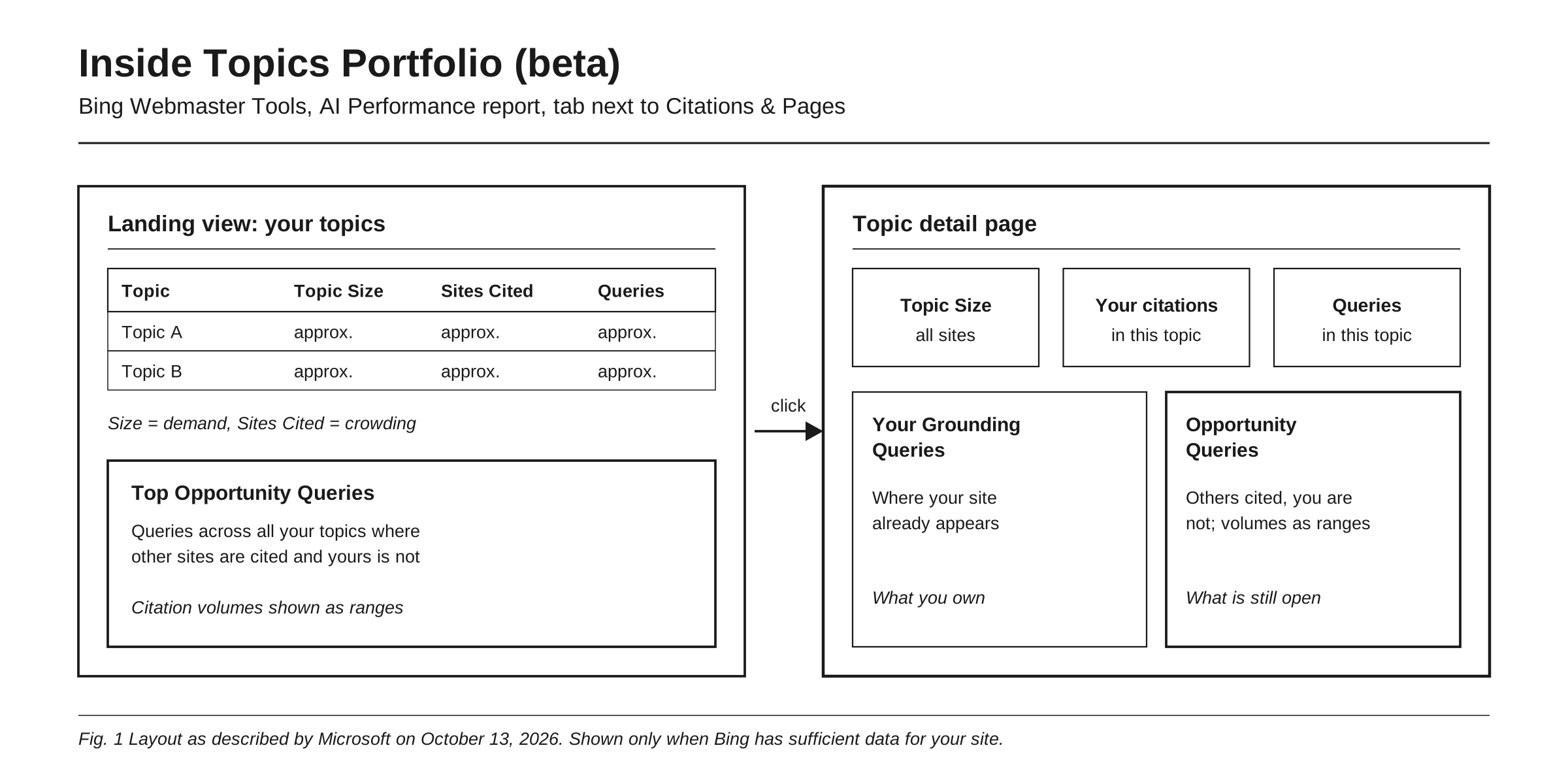
Topics Portfolio is a new beta view inside the AI Performance report in Bing Webmaster Tools, announced by Microsoft on October 13, 2026. It groups the grounding queries where your site appears into topics and shows, for each one, an approximate Topic Size (total citations across all sites), how many sites get cited, and how many queries the topic holds. Below that, it lists opportunity queries: queries where other sites are cited and yours is not, with volumes shown as ranges. The data is free and first-party, and Microsoft says the opportunity queries are “drawn from real grounding activity happening on Bing,” which makes it a rare source of topic-level demand data for AI search. It also has hard limits: it is beta, approximate, limited to Microsoft’s own AI surfaces, it appears only for sites with enough data, and none of its announced metrics measure clicks.
That makes it a planning tool, not a scoreboard. Here is how to read it and turn it into a content plan.
What Topics Portfolio is, and where it came from
Topics Portfolio is the third step in a short sequence. Microsoft launched AI Performance in public preview on February 10, 2026, describing it as insights that show “how publisher content appears across Microsoft Copilot, AI-generated summaries in Bing, and select partner integrations.” The report counts citations, cited pages and grounding queries, which Microsoft defines as “the key phrases the AI used when retrieving content that was referenced in AI-generated answers.” Microsoft also notes that the grounding query data “represents a sample of overall citation activity.”
On June 16, 2026, Microsoft added four preview features: Intents, Topics, Citation Share and Compare. In the same post it defined grounding as “the source material and web evidence the system uses to support and cite its response.” Those first Topics labels, as Search Engine Journal noted, only grouped queries where your site was already cited.
The October release changes the frame. According to Microsoft’s post, Topics Portfolio adds three things: a portfolio view of your topics, “ecosystem context” on how big and crowded each topic is, and opportunity queries “drawn from real grounding activity happening on Bing.” Everything is personalized: the topics and opportunities come from your own presence in AI Search, “not from a generic ecosystem list.”
To find it, open AI Performance in Bing Webmaster Tools. If Bing has enough data for your site, a Topics Portfolio tab sits next to Citations & Pages. You can pick a one, two or three-month window.
The three measures and the opportunity list
The landing view lists the topics where your site has a meaningful presence, with three ecosystem measures beside each.
Topic Size is “the approximate total citations across all sites for this topic over the selected period.” Microsoft frames it as a measure of AI Search demand. It counts citations, not searches.
Sites Cited is “the approximate number of sites appearing for queries in this topic,” which Microsoft says “indicates how crowded the topic is.”
Queries is “the approximate number of distinct grounding queries in this topic.”
Top Opportunity Queries sits below the table: “the strongest queries across your whole portfolio where other sites appear and yours does not.” Volumes here are ranges, not exact figures.
Click a topic and you get a detail page with three cards (Topic Size, your own citations in the topic, and the query count) and two tables. Your Grounding Queries shows where you already appear. Opportunity Queries shows where others are cited and you are not. Microsoft calls these “the two halves of a topic: what you already own, and what is still open.”
One useful derived number: your citations in a topic divided by Topic Size gives a rough share of that topic’s citations. It inherits the approximation of both inputs, so use it to compare your topics, not as a precise market share. Microsoft is explicit on this point: “Treat the numbers as directional signals for planning, not as a precise ledger.”
From topic list to content plan: a step-by-step workflow
Microsoft’s own starting advice is to “start with the topics where your citations are already concentrated, then work down the opportunity queries.” Here is our own fuller workflow (Rankry’s, not Microsoft’s) to run monthly.
-
Fix a window and snapshot it. Use the three-month window for planning so short spikes matter less. Record each topic’s Topic Size, Sites Cited, Queries and your citations in a sheet, with the date. In a beta report, your own log is the baseline.
-
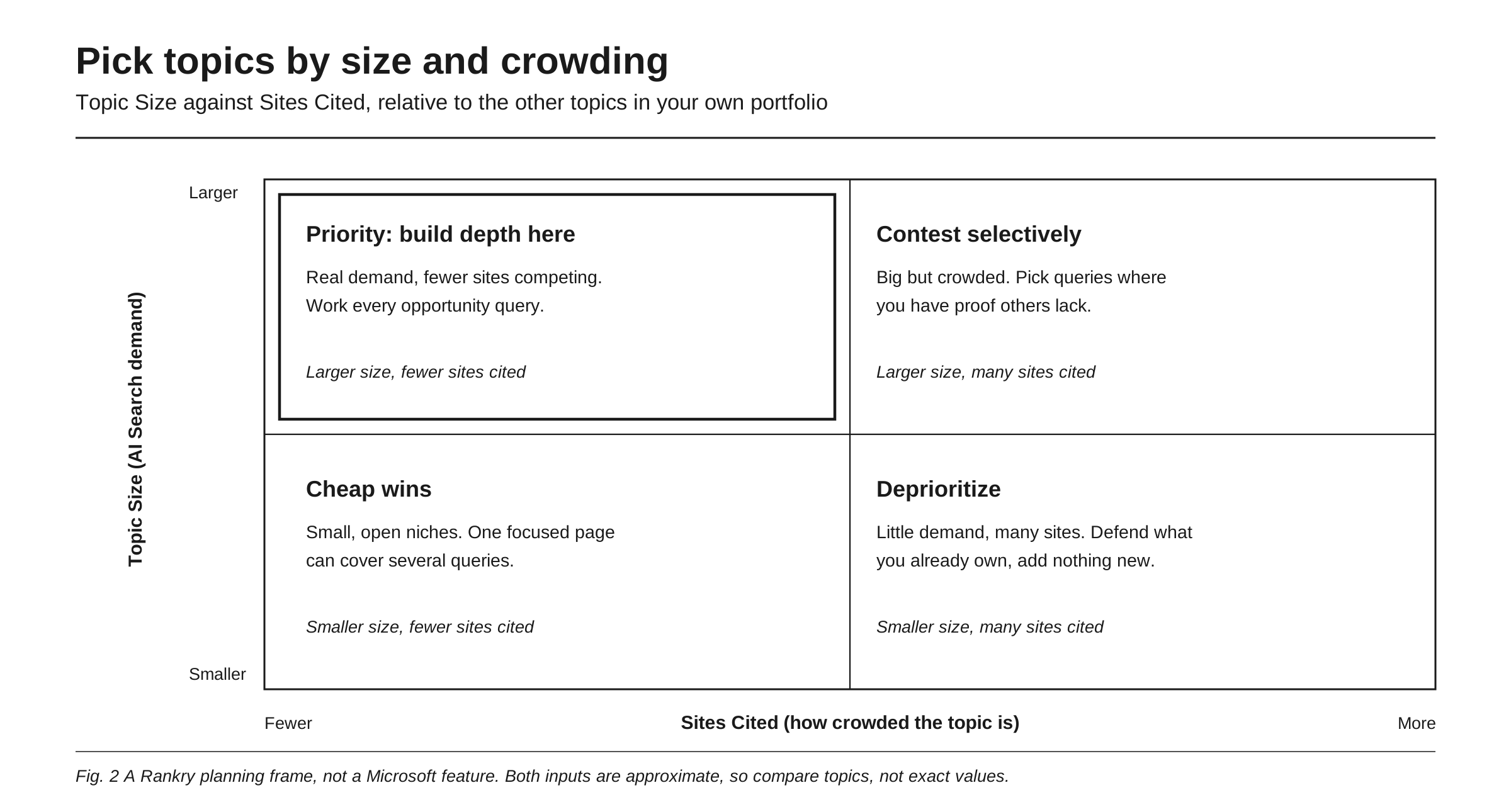
Sort topics by size and crowding. Rank topics against each other, not against an absolute threshold. Larger topics with fewer sites cited are your priority. Larger and crowded topics are worth contesting only where you hold proof others lack. Smaller, open topics are cheap wins. Smaller, crowded topics get maintenance only.
-
Check your share inside each priority topic. Compare your citations with Topic Size on the detail page. A big topic where you hold a thin share is a better bet than a big topic you already dominate.
-
Clean the opportunity list. Microsoft warns that “branded queries can appear as opportunity queries,” for example a competitor’s product name. Remove those, remove queries you cannot answer credibly, and mark misfits with the thumbs-down control, which Microsoft says sends the signal to the team working on classification and opportunity selection.
-
Map each opportunity query to one page. Check Your Grounding Queries and Citations & Pages first. If a page already earns citations in that topic, extend it. If nothing fits, plan a new page. Give each cluster of related queries one primary page, so you do not split citations across near-duplicates.
-
Rank by range, not by false precision. Opportunity volumes are ranges. Sort queries into high, middle and low range buckets and work the top bucket first, without pretending you know the exact gap between two queries in the same range.
-
Write for retrieval. Microsoft’s own guidance in the February launch post points to clear headings, tables and FAQ sections, claims supported by evidence, fresh content, and IndexNow to notify participating search engines when pages change.
-
Re-snapshot and track movement. Each month, check whether target queries moved into Your Grounding Queries and whether your citations rose against Topic Size. The Compare feature, added in June, overlays a previous period on the AI Performance view to help spot trend changes.
-
Carry the queries into your wider prompt set. Microsoft defines grounding queries as the key phrases the AI used when retrieving content, and Search Engine Roundtable noted at launch that they “do not seem to be the actual queries users are searching.” Rewrite the best ones as natural buyer questions and track them across other assistants too, using the method in how to find prompts where your brand should appear.
Limits to keep in mind
It is beta, and the topics are machine-made. Microsoft says “topic classification is AI-generated and can occasionally be imperfect, so a query may land in a topic you would have labelled differently.” Judge topics by the queries inside them, not by the label.
Not every site will see it. “Topics with insufficient site presence or insufficient ecosystem activity are not shown, so smaller sites may see a shorter list or may not even see this feature.” A missing tab means not enough data, not a penalty.
The numbers are approximate and partly ranged. Topic Size, Sites Cited and Queries are approximate; opportunity volumes are deliberately ranges. Good for ranking, weak for forecasting.
It counts citations, not clicks. None of the metrics Microsoft has announced for AI Performance measure clicks or visits, and Microsoft says Citation Share does not “represent traffic share.” Search Engine Roundtable flagged “no click data” at launch in February, and its October 13 coverage of Topics Portfolio said “No click data yet.”
It covers Microsoft’s grounding only. The underlying report spans Copilot, AI-generated summaries in Bing and select partner integrations, per Microsoft. The three Microsoft posts cited here do not name the partners. Nothing here tells you what ChatGPT, Claude, Gemini, Perplexity or Google’s AI features cite. Sites Cited is described as a count of sites, not a list of domains, and the June post states Citation Share “does not expose competitor domains,” so expect to see that a topic is crowded, not who crowds it.
How it fits with Google Search Console’s generative AI reports
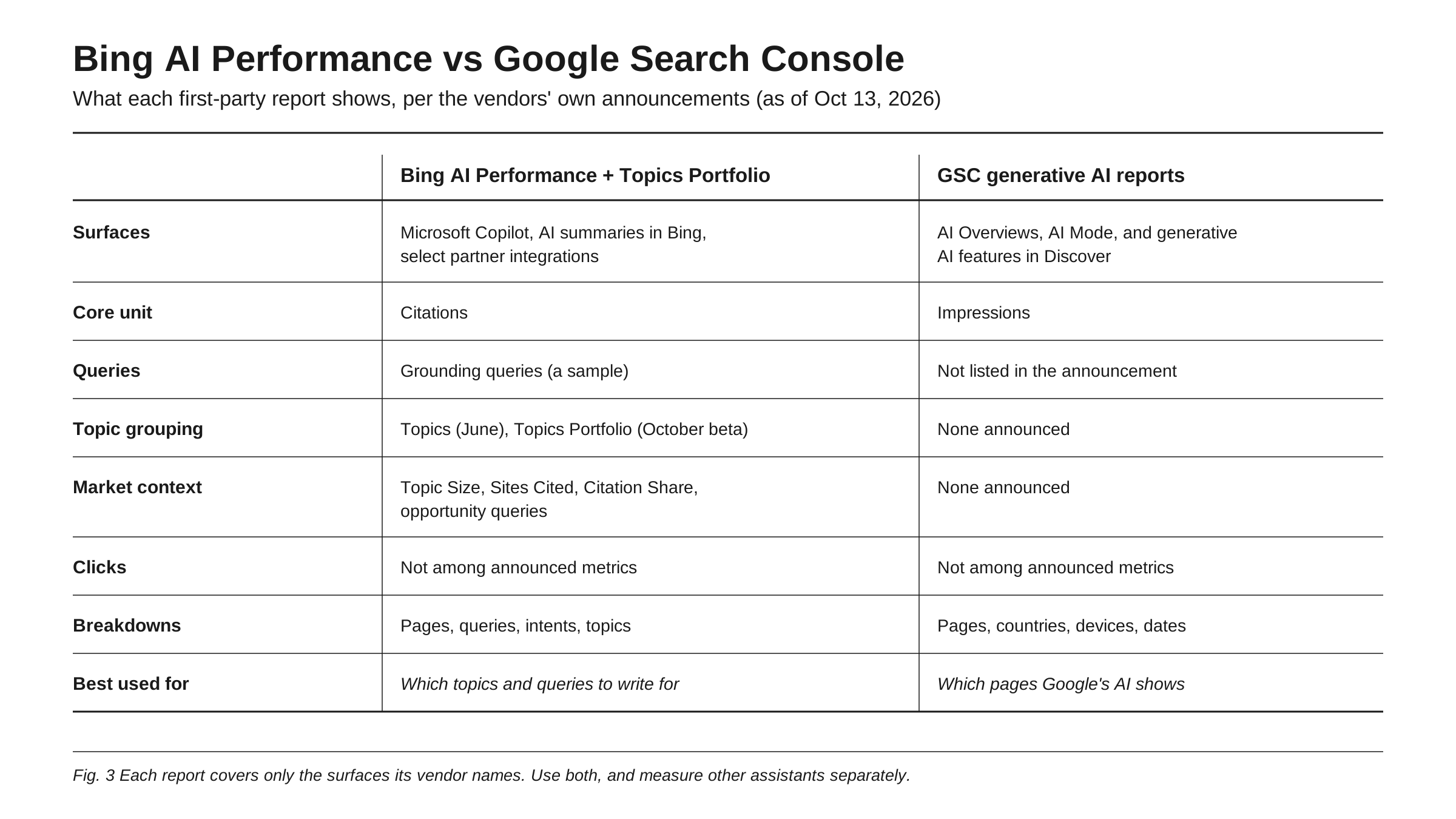
Google took a different route. On June 3, 2026, it announced Search Generative AI performance reports in Search Console, showing impressions for your URLs in generative AI features such as AI Overviews and AI Mode, plus generative AI features in Discover. The dimensions Google lists are pages, countries, devices (for Search) and dates, with hourly to monthly granularity. Google’s note on the post says the reports reached all websites worldwide as of August 31, 2026. The announcement does not list a query dimension, a click metric or any competitive context.
So the two reports answer different questions. Search Console tells you which of your pages Google’s AI features showed, where and when. Bing tells you which topics and grounding queries you are cited for, how big and crowded each topic is, and which queries you are missing. The setup is covered in Google Search Console for AI visibility, and the GSC side is read in detail in how to read Search Console’s generative AI report.
A practical way to combine them: use Topics Portfolio to choose topics and queries, ship or update the mapped pages, then watch two signals. In Bing, check whether those queries move into Your Grounding Queries. In Search Console, check whether the same URLs start drawing generative AI impressions. Treat Bing gaps as hypotheses for Google, not proof: they are different systems.
How Rankry fits
Both first-party reports stop at their vendor’s surfaces, and neither shows what an AI answer says about your brand. Rankry tracks how ChatGPT, Claude, Gemini, Perplexity, Grok and Google AI Mode and AI Overviews mention, rank, cite and recommend brands, using a stable set of buyer-intent prompts tracked every day, with competitor comparison alongside. Its Google Search Console integration brings your GSC data into the same place, and an opportunity query from Bing becomes a prompt, answered as soon as you add it. The workflow above produces a list of topics and queries; Rankry shows whether what the other assistants say changes after you ship those pages.
FAQ
What is Topics Portfolio in Bing Webmaster Tools? It is a beta view in the AI Performance report, announced October 13, 2026. It groups the grounding queries where your site appears into topics and shows each topic’s approximate Topic Size, Sites Cited and query count. It also lists opportunity queries where other sites are cited and yours is not, with citation volumes shown as ranges rather than exact numbers.
Does Topics Portfolio cover Microsoft Copilot? Topics Portfolio is built on the AI Performance report, which Microsoft described at launch as covering Microsoft Copilot, AI-generated summaries in Bing, and select partner integrations. The Microsoft posts cited here do not name the partners. The October announcement itself does not list surfaces, so read the data as Microsoft grounding activity, not as a view of ChatGPT, Gemini, Perplexity or other assistants.
Why don’t I see the Topics Portfolio tab? Microsoft shows the tab only when there is sufficient data for your site. Topics with insufficient site presence or insufficient ecosystem activity are hidden, so smaller sites may see a short list or no feature at all. That reflects data volume, not a penalty. Keep publishing and check again, and confirm your site is verified in Bing Webmaster Tools.
Why are opportunity query volumes shown as ranges? Microsoft deliberately shows opportunity citation volumes as ranges and calls Topic Size, Sites Cited and Queries approximate. It asks users to treat the numbers as directional signals for planning, not a precise ledger. In practice, sort opportunities into range buckets and work the highest bucket first instead of over-reading small differences.
Does Topics Portfolio show clicks or traffic from AI answers? No. The metrics Microsoft has announced for AI Performance count citations, cited pages and grounding queries, and Microsoft says Citation Share does not represent traffic share. Search Engine Roundtable noted “no click data” when the report launched and “No click data yet” for Topics Portfolio. Measure visits from AI answers separately in your analytics and compare them with the topics you target.
Sources
- Introducing Topics Portfolio (Beta) in AI Performance, Microsoft Bing Webmaster Blog, October 13, 2026
- Introducing AI Performance in Bing Webmaster Tools Public Preview, Microsoft Bing Webmaster Blog, February 10, 2026
- New AI Visibility Insights in Bing Webmaster Tools: Intents, Topics, Citation Share, Compare, Microsoft Bing Blog, June 16, 2026
- Introducing Search Generative AI performance reports in Search Console, Google Search Central Blog, June 3, 2026
- Bing Webmaster Tools Sorts AI Search Queries Into Topics, Search Engine Journal, October 13, 2026
- Bing Webmaster Tools Rolls Out AI Performance Report (With New Design), Search Engine Roundtable, February 11, 2026
- Topics Portfolio In Bing Webmaster Tools AI Reports, Search Engine Roundtable, October 13, 2026
See what ChatGPT, Claude, Gemini, Perplexity, Grok and Google’s AI features say about your brand, alongside the topics Bing shows you. Start a free 7-day Rankry trial, no card required.